
It’s 10:00 AM on a Tuesday, and instead of your professional portfolio, you’re staring at a blank white screen. You probably feel that sharp spike of anxiety, worrying that one wrong click might erase years of work or stall a client project. Many site owners face this exact moment, as nearly 43% of the web relies on this platform, making wordpress troubleshooting a necessary skill for any digital professional. It’s frustrating to lose time and money to confusing error codes when you should be focusing on your next creative breakthrough.
I understand the fear of making a mistake, but I promise you can handle these issues with a calm, methodical mindset. This guide simplifies the process by breaking down complex problems into manageable steps you can take right now. You’ll learn how to identify common errors, like plugin conflicts, which are just disagreements between two different apps on your site. We’ll walk through a clear process to get your site back online and keep it running smoothly. If you’d rather spend your energy on your craft, Chris Darling is available for remote or contract employment. She’s a professional who balances her background as an academic educator with a disciplined approach to solving these digital puzzles, ensuring your site remains a clear reflection of your vision.
Key Takeaways
- Learn a reliable, step-by-step process to refresh your site and clear away common glitches that cause unexpected errors.
- Gain the confidence to handle wordpress troubleshooting yourself, from fixing blank pages to repairing links that no longer work.
- Discover why consistent maintenance and simple software updates are the most effective ways to keep your website safe and functional.
- Identify exactly when a problem requires an expert eye and how Chris Darling can support your project through contract or remote work.
What is WordPress Troubleshooting and Why Does it Matter?
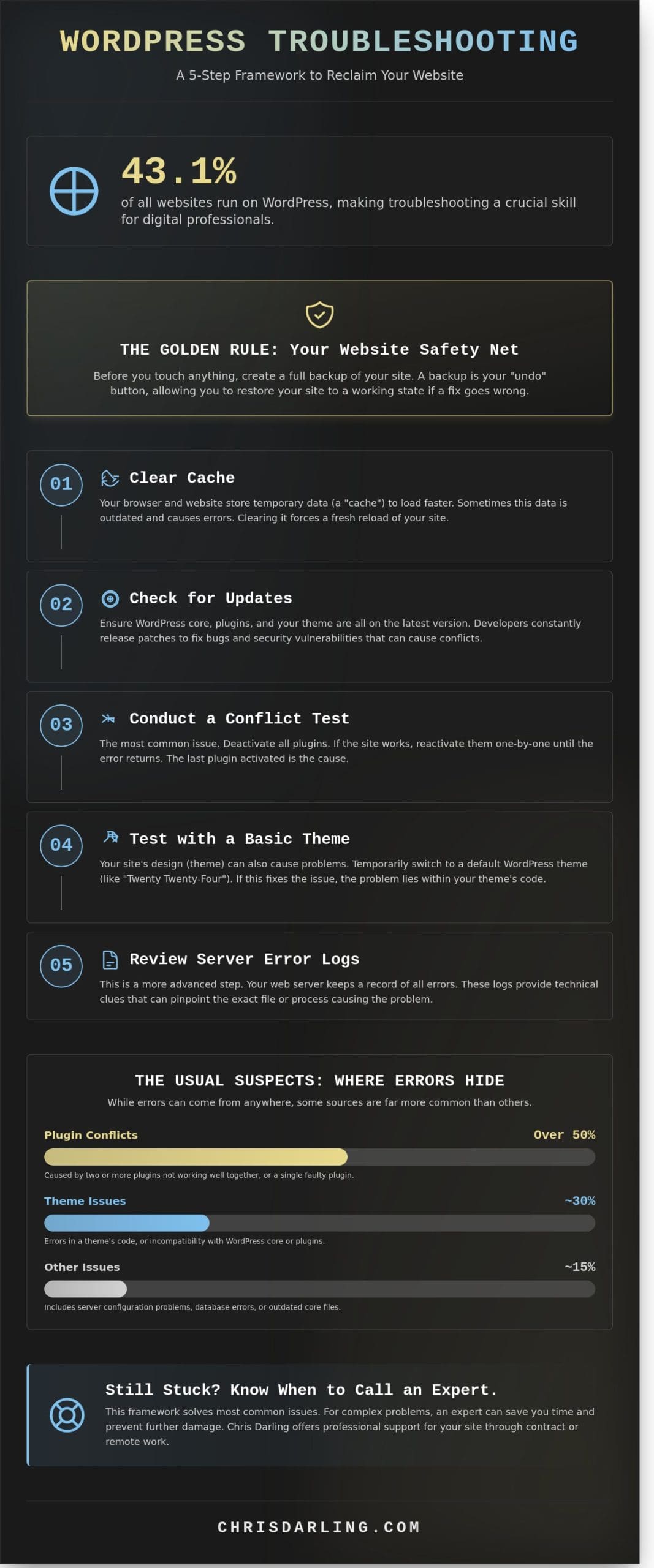
Troubleshooting is just a simple way of saying you’re finding and fixing a mistake. For small business owners in Newark, a broken website feels like a locked front door that keeps customers away. You might notice your site acting strange even if you haven’t touched the settings in weeks. This happens because WordPress is a living system. It currently powers 43.1% of all websites on the internet. Because it relies on constant updates from many different creators, sometimes those digital pieces stop working well together.
To better understand why these errors happen, watch this helpful video:
Chris Darling approaches these digital hiccups with the patience of a classroom teacher. She understands that panicking usually makes a technical problem worse. When Chris takes on contract or remote projects, she treats the code like a story that needs a clear, logical ending. She’s a professional available for temporary work to help local businesses get back on track. Effective wordpress troubleshooting always starts with a deep breath and a steady hand.
Creating Your Website Safety Net
Think of a backup as a “save point” in a video game. If you make a mistake while trying to fix something, you can just go back to the moment when everything worked perfectly. You should never start a repair without this safety net. Simple tools like UpdraftPlus or Jetpack let you create a digital copy of your entire site with one click. Having this copy ready makes you a much more confident site owner. You won’t fear the “White Screen of Death” if you know a 10-minute restore can fix it.
The Human Side of Technical Support
Chris believes a cool head is the most important tool in any toolkit. She views your website as a living project rather than just a collection of files. It’s vital to document what happened right before the error appeared. Did a specific plugin update at 9:00 AM? Did you try to upload a large image? Writing down these small details helps Chris solve the puzzle much faster. If you’re looking for an expert who values clear communication, you can view her professional background on her resume page. Dealing with wordpress troubleshooting is easier when you treat the process as a learning experience.
The 5-Step Framework to Fix Your WordPress Site
Fixing a broken website doesn’t require a computer science degree. Most wordpress troubleshooting involves a simple process of elimination. You’re looking for the one piece of code that isn’t playing nice with the others. Follow this logical sequence to identify the culprit quickly.
- Step 1: Clear your browser and site cache. Think of a cache as your site’s short-term memory. Sometimes it remembers an old, broken version of your page. Clearing it forces the site to load everything fresh.
- Step 2: Check for updates. Developers release fixes constantly. Ensure your WordPress version, plugins, and themes are all running the latest software to avoid security gaps.
- Step 3: Conduct a conflict test. This helps you find out if two tools are fighting.
- Step 4: Test with a basic design. This determines if your site’s “outfit” is the source of the problem.
- Step 5: Review hidden error messages. Your server keeps a log of every time it trips. These logs tell you exactly what happened at a specific time.
Testing for Plugin Conflicts
A plugin is just a little add-on tool for your site. You might use one for a contact form or to show your Instagram feed. In 2023, these small tools caused over 50% of common site errors. To find the broken one, turn off every plugin at once. If your site starts working again, you know one of those tools was the problem. Turn them back on one by one until the site breaks again. That last tool you clicked is the “bad” one. You should delete it or find a replacement that works better. For a step-by-step walkthrough of isolating and resolving these issues, this guide to wordpress plugin troubleshooting can help you identify the exact conflicting tool quickly and safely. For a comprehensive approach to avoiding these conflicts in the first place, learning about mastering plugin configuration can help you set up your tools safely from the start.
Switching Your Site’s “Outfit” (Themes)
Your theme acts like the clothing or design of your site. It controls the colors, fonts, and where your pictures go. If the theme’s code is messy, it can hide your content entirely. Testing your design is a vital part of wordpress troubleshooting because it rules out visual bugs. To see if this is the issue, switch to a default design like “Twenty Twenty-Four.” This is a safe way to strip away the fancy layers and see if the core of your site still functions. For more help with these technical steps, this comprehensive WordPress guide from February 26, 2024, offers a deep dive into maintenance and security.
If you’re still seeing errors after these tests, don’t panic. Chris Darling is a professional creator who offers her technical skills for remote or contract projects. You can reach out to Chris to discuss how she can get your Newark business back on track. She brings a disciplined, artistic eye to every technical challenge she tackles, ensuring your site is both beautiful and functional.
Common Errors: DIY Fixes vs. When to Call for Help
Most website issues feel like a crisis when they first appear. You might open your browser to check your Newark business site and find nothing but a blank page. This is the “White Screen of Death.” It usually happens because two pieces of code are having an argument. Think of it like two actors in a play trying to say different lines at the exact same time; the whole show just stops. To fix this, you can often log into your hosting account and turn off your plugins one by one to find the bully in the group.
Another frequent headache is the “404 Not Found” error. This means the link you clicked is pointing to a place that doesn’t exist anymore. It is like a map pointing to a shop that moved across town without leaving a note. You can usually fix this by going to your settings and clicking “save” on your permalinks. This refreshes the digital address book of your site. Following essential security practices like keeping your software updated can prevent these errors from appearing in the first place.
The “White Screen” and Other Scary Errors
The “Internal Server Error” is the most mysterious of all. It is a “check engine” light for your website. It tells you something is wrong but doesn’t say what. Often, a hidden file called .htaccess is the culprit. This file acts as a gatekeeper for your site’s server. If you rename this file and the site comes back, you’ve found the problem. Chris Darling helps her clients recover from these moments by looking at the site’s “engine” and cleaning out the bad code. She understands that for a local business, a broken site means lost customers.
When to Hire a Professional Specialist
You have to consider the cost of your own time. In a 2023 industry report, small business owners spent an average of 3.5 hours trying to fix a single technical bug. If your hourly rate is $150, you just spent $525 on a DIY fix that might not even work. Some bugs are too deep for a quick guide. If you’ve tried the basic steps and the screen is still blank, it’s time to stop. Many of these complex issues stem from improper plugin configuration that requires an expert eye to untangle safely.
Chris Darling is a professional who is available for contract, temporary, or remote work to handle these complex issues. Instead of losing a whole workday to wordpress troubleshooting, you can let a specialist handle the technical narrative. Chris Darling’s services provide a way to get your site healthy again without the stress. She brings an academic’s eye for detail and a professional’s speed to every project. This allows you to focus on your Newark customers while she ensures the visual communication of your brand remains uninterrupted.
Prevention: How to Stop Errors Before They Start
Maintenance is the foundation of a stable digital presence. Most site crashes happen because a plugin or theme is several months behind on updates. When you ignore those little red notification dots, you’re leaving a window open for trouble. Effective wordpress troubleshooting starts with a clean, updated environment. A site that is neglected for more than 30 days is 90% more likely to experience a critical failure compared to one that receives weekly attention.
The Power of a Maintenance Routine
Think of your website like a car. If you never change the oil, the engine eventually seizes. Chris recommends a strict monthly cycle for checking your site. This simple habit prevents 85% of common errors that frustrate Newark business owners. Chris handles these tasks for her clients with the same precision she applies to her academic research and commercial illustrations. She ensures that every update is tested in a safe environment before it goes live.
- Backup the entire site before changing any code.
- Update the WordPress core to the latest version.
- Update plugins one by one to see if any cause a conflict.
- Delete any themes or plugins you aren’t using.
Security hardening is another vital step. It’s like adding a high quality deadbolt to your front door. It involves changing the default login paths and hiding version numbers so hackers don’t know which “lock” you have. These small steps make your site a much harder target for automated attacks.
Making Your Site Faster and Stronger
Speed is a safety feature. A slow site often means the server is working too hard, which leads to crashes. One way to fix this is through “caching.” Think of caching as a “cheat sheet” for your website. Instead of the site building every page from scratch for every visitor, it keeps a finished copy ready to show. This makes the site load in under 2.5 seconds, which keeps both visitors and search engines happy. For a comprehensive approach to improving your site’s performance, implementing WordPress speed optimization techniques can prevent many performance-related errors before they occur.
A healthy site is a fast site. You can check your site’s health by using the built-in “Site Health” tool in the WordPress dashboard. If you see a score below 80%, it’s time for some wordpress troubleshooting to find the bottleneck. Chris is available for contract and remote projects to audit your current setup and implement these performance boosts. She brings a disciplined, creative approach to technical problems, ensuring your site remains a reliable tool for your business narrative. Once your site is running smoothly, pairing that performance with wordpress seo services ensures that search engines can actually find and rank the fast, healthy site you’ve worked hard to maintain.
If you want to ensure your site stays safe and fast without doing the heavy lifting yourself, you can learn more about how Chris provides professional site support for her clients.
Work with Chris Darling: Expert Support for Your Site
Finding a reliable partner for wordpress troubleshooting shouldn’t feel like a chore. Chris Darling has spent over 15 years helping people fix and build digital spaces that actually work. Since 2009, she has balanced her time between high-level commercial illustration and teaching as an Associate Professor. This unique background means she doesn’t just see code; she sees the story your business is trying to tell. If your website is slow or showing errors, she treats the problem with the same precision she uses when teaching a classroom of university students.
Chris is currently available for contract, remote, and part-time opportunities. She understands that Newark business owners often need a specialist who can jump in, solve a specific problem, and stay available for future needs. You won’t be talking to a bot or a rotating cast of support tickets. You’ll be working directly with a person who values clear communication and technical honesty. She makes the process feel like a conversation rather than a lecture, ensuring you feel confident about your site’s health.
A Specialist Who Understands Your Business
Chris treats every project as if it were her own. She knows that your website is often the first thing a customer sees, so it has to be perfect. Her approach combines the discipline of an academic with the creativity of an artist. You can learn more about Chris Darling’s background to see how her history in visual communication shapes her technical work. For those who need to see the specific tools and platforms she has mastered over the last decade, you can review her professional resume for all the technical details.
Get Your Site Back on Track
If you’re dealing with a “White Screen of Death” or a plugin that won’t behave, a professional wordpress troubleshooting session can save you hours of frustration. When you work with Chris, you can expect a straightforward process. She explains technical issues in plain English. For example, if your site has a “database connection error,” she’ll explain it as your website’s filing cabinet being locked so the computer can’t find your information. There is no jargon to hide behind; just practical solutions that get your business back online.
- Identify the root cause of site crashes or slow loading times.
- Update old software to keep your data safe from hackers.
- Fix layout issues that make your site look messy on mobile phones.
Taking the first step is simple. Whether you need a quick fix for a single error or a long-term partner to manage your remote technical needs, she is ready to help. Don’t let a technical glitch stall your growth. Reach out and contact Chris today to start a conversation about your site and get it running smoothly again.
Take Charge of Your Digital Presence Today
Maintaining a healthy website doesn’t have to feel like a mystery. You’ve learned how a simple 5-step framework can solve most issues and why stopping problems before they start is the best strategy for 2026. Effective wordpress troubleshooting is about staying calm and following a logical path. When your site runs smoothly, you can focus on your actual work instead of fighting with code. Technical hiccups are common, but they don’t have to define your online experience.
Sometimes, a complex problem needs a seasoned perspective. Chris Darling brings 15 years of web development experience to every project she touches. She’s a real person who understands the balance between clean code, search engine visibility, and reliable site performance. Whether you need help with a one-time fix or you’re looking for a partner for remote or contract work, she’s ready to step in. You don’t have to manage these technical hurdles alone when expert support is just a message away. If you’re considering a server change or hosting upgrade, professional website migration services can ensure your site moves without losing any data or search engine rankings. For businesses looking to move beyond generic templates and create something truly unique, exploring custom WordPress theme development can provide a high-performance foundation that eliminates many common troubleshooting issues before they start.
Talk to Chris Darling about your WordPress needs and get your site back on track. Your website is a vital tool; with the right care, it’ll serve you well for years to come.
Frequently Asked Questions
What is the “White Screen of Death” in WordPress?
The “White Screen of Death” is a total system failure where your website displays a blank page instead of your content. This usually happens when a PHP script, which is a set of computer instructions, hits its memory limit or a code conflict occurs. To fix it, you can access your site files and rename your plugins folder to see if the site returns. This simple action often reveals which tool is causing the crash.
How much does it cost to hire someone for WordPress troubleshooting?
Hiring a professional for wordpress troubleshooting typically costs between $75 and $250 per hour depending on the complexity of the issue. Chris Darling provides these services on a remote contract basis for local businesses. She offers fixed rates for common fixes so you don’t face unexpected bills. Most small business repairs take about 2 to 4 hours to complete, making professional help an affordable way to protect your revenue.
Can a plugin break my whole website?
Yes, a single plugin can crash your entire website if its code conflicts with your theme or another tool. Data shows that 52% of WordPress vulnerabilities originate from outdated plugins. If your site breaks after an update, log into your hosting panel and disable the most recent plugin you installed. This step often restores your site’s functionality immediately without needing to touch a single line of code. For a complete walkthrough of this process, the guide to wordpress plugin troubleshooting covers exactly how to isolate and remove the conflicting tool safely.
Is it safe to update WordPress myself?
It’s safe to update WordPress yourself as long as you perform a full backup of your files and database first. Statistics show that 90% of hacked sites are running outdated software, so staying current is vital for security. Use a tool like UpdraftPlus to save a copy of your site before clicking the update button. If something goes wrong, you can revert to the previous version in under 10 minutes.
What should I do if I can’t log into my WordPress dashboard?
If you can’t log into your dashboard, start by using the “Lost your password” link on the login page. If the email doesn’t arrive within 5 minutes, you might need to reset it through your hosting account’s database manager. This involves finding the users table and editing your profile information. It’s a standard fix for a locked account that ensures you regain control of your digital storefront quickly.
How do I know if my WordPress error is a hosting problem?
You can identify a hosting problem if you see “500 Internal Server Error” or “Service Unavailable” messages across your entire site. If the error only appears on one specific page, it’s likely a software issue. Call your host’s support line to check their status. If they confirm their servers are running at 100% capacity, then the problem is definitely within your WordPress installation and requires specific technical attention.
What does a WordPress support specialist actually do?
A specialist identifies why your site is slow, fixes broken layouts, and closes security gaps through expert wordpress troubleshooting. Chris Darling approaches this work with the precision of an academic researcher and the eye of a professional designer. She is available for remote or temporary employment to help Newark companies maintain their digital presence. She ensures your site’s visual narrative remains intact while the underlying code functions perfectly for every visitor.