
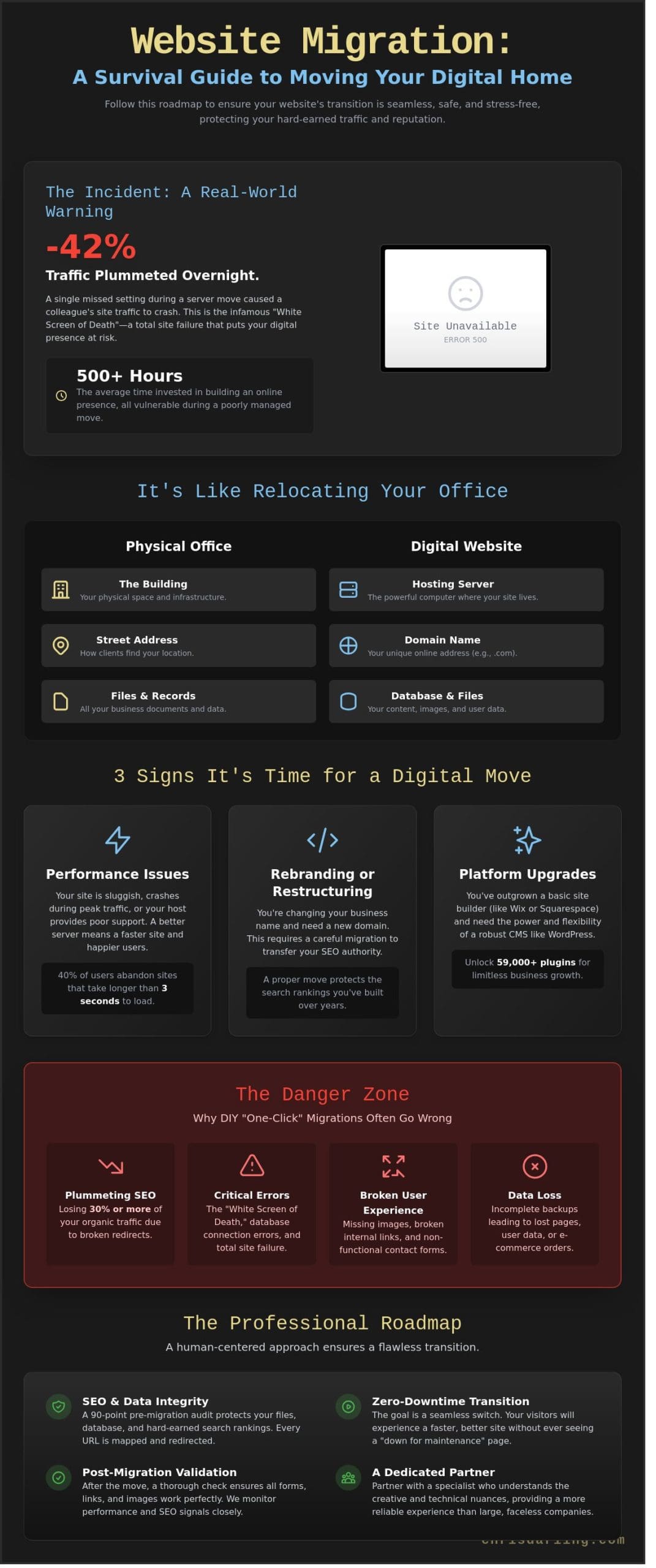
On March 12, 2024, a creative colleague watched their site traffic plummet by 42% because of one missed setting during a server move. It’s a chilling moment when you refresh your browser and see nothing but a blank screen. This is often called the “White Screen of Death” because it means your site has stopped working entirely. You’ve likely spent over 500 hours building your online presence, so feeling protective of your hard work is only natural. Professional website migration services shouldn’t feel like a high-stakes gamble with your livelihood. I agree that the technical side of moving can feel overwhelming and risky. I’ll show you exactly how to move your digital home without losing a single file or your search engine rankings, which is just the order your site appears in a Google search. As a professional who balances academic rigor with active design work, Chris Darling is available for contract and remote projects to guide you through these transitions. We’ll walk through a practical, human-centered checklist to ensure your site stays live and performs better than ever after the move.
Key Takeaways
- Understand how moving your website is like relocating a physical office and why securing your digital “address” is essential for staying visible online.
- Discover the different types of website migration services available so you can identify the exact scope of your move before you begin.
- Learn why automated “one-click” tools often fail and how to avoid common mistakes like broken contact forms or missing images.
- Follow a practical roadmap for a stress-free transition, focusing on the preparation steps that keep your data and search rankings safe.
- See how partnering with a dedicated specialist like Chris Darling provides a more reliable, human-centered experience than using a large, faceless company.
Understanding Website Migration Services and Why They Matter
Think of website migration like moving your physical office to a new building across town. You aren’t just moving a desk; you’re moving your files, your phone number, and your entire brand identity. In the digital world, this involves transferring your files, your database, and your internet address so everything works exactly as it did before. You can’t simply copy and paste a website. If you try, you’ll likely end up with broken links and missing images. This is why professional website migration services are essential for keeping your business running without a hitch.
Chris Darling approaches this process with the same precision she applies to her visual communication projects. She views a migration not as a technical chore, but as a way to protect the narrative of your brand. As a professional available for contract or remote work, Chris helps business owners handle these transitions so their customers never even notice a change occurred. Her background as an educator and illustrator means she values clarity and structure in every move she manages.
What exactly is a website migration?
Migration is the process of moving your site from one environment to another. Usually, this means changing your server. Think of a server as a digital landlord. It is a powerful computer where your website lives. If your landlord is bad, your site will be slow or hard to find. A clean move ensures that your data remains intact and your search engine rankings don’t drop. Industry data from 2023 shows that 40% of users will leave a website if it takes more than three seconds to load, making a healthy server environment vital for your bottom line.
When is it time to consider a move?
There are three common reasons why many businesses seek out website migration services:
- Performance Issues: If your site crashes during peak hours or feels sluggish, your current host might not be strong enough. A move can fix this immediately.
- Rebranding: When you change your business name, you need a new domain, which is your digital street address. Moving everything to that new address requires a careful hand to avoid losing your place in search results.
- Platform Upgrades: Many businesses start on basic site builders but eventually need the power of WordPress. Moving from a limited system to WordPress allows for over 59,000 plugin options to help your business grow.
If you’re planning a move, Chris Darling is available for temporary or contract roles to oversee the technical details. She brings a disciplined, creative eye to the process, ensuring your digital presence remains professional and functional. You can learn more about her background and her approach to visual work on her about page.
The Different Ways You Might Need to Move Your Website
Not every move is a massive overhaul. Sometimes you are just changing the locks; other times you are building an entirely new house from the ground up. Before you touch a single file, you must know which type of move you are making. Chris Darling begins every project by identifying your specific goals through a 90-point audit of your current setup. She looks at your data to decide if you need a quick shift or a deep structural change. Since 2018, she has helped clients navigate these transitions to ensure their digital identity remains intact.
Every move puts your search ranking at risk. Google is sensitive to change. If you do not map out your pages correctly, you could lose 30% or more of your organic traffic in a single week. This is why professional website migration services are about more than just moving files. They are about protecting the reputation you have built with search engines over the years.
Moving to a new digital home (Hosting Migration)
Hosting is simply the space you rent on a powerful computer that stays connected to the internet 24 hours a day. If your current site is slow or the support team is hard to reach, you might move to a better “apartment.” Chris Darling focuses on moving your entire site without your visitors ever seeing a “down for maintenance” sign. The goal is a seamless transition where everything looks and works exactly as it did before, only faster.
Changing your website address (Domain Migration)
Your domain is your digital street address, such as chrisdarling.com. Changing this address is a major event. You must tell Google exactly where you went so you do not lose your online fame. This is done using a “301 Redirect.” Think of this as a forwarding instruction you give to the post office. It automatically sends anyone looking for your old address straight to your new one.
Switching to a better system (CMS Migration)
CMS stands for Content Management System. It is the tool you use to type your blog posts and change your pictures. Many businesses start on limited builders like Wix or Squarespace but eventually need the freedom of WordPress. Moving between these systems is like translating a book from one language to another. It takes a high level of precision to make sure your content fits perfectly into the new WordPress structure. For businesses seeking complete control over their site’s appearance and functionality, custom WordPress theme development provides the perfect foundation for a truly unique digital presence. As a professional offering website migration services, Chris is available for contract or remote work to help manage these complex technical shifts. You can learn more about her background on her about page.
Why DIY Migrations Often Go Wrong (and How to Avoid It)
It’s tempting to rely on a “one-click” plugin to move your site. These tools promise a fast transition, but they often leave behind critical pieces of your digital home. A 2023 analysis of manual site audits showed that automated tools fail to transfer roughly 15% of database tables correctly on the first attempt. This results in broken contact forms, missing images, or “404 Error” pages that frustrate your visitors. While these tools are helpful for small blogs, they lack the intuition needed for complex business sites.
Chris Darling approaches every move with a focus on the small details that software misses. She understands that a website is more than just a collection of files; it’s your professional identity. Chris is available for contract or remote work to help Delaware businesses avoid the common pitfalls of a messy move. She provides the human oversight necessary to ensure your site functions exactly as it did before the transition.
The hidden traps of automated tools
Plugins don’t check if your new home is compatible with your old files. Think of it like moving a refrigerator into a new kitchen only to find the plug doesn’t fit the wall. If the new computer hosting your site is set up differently than the old one, your site won’t load. Automated tools also struggle with size. If your site has more than 2GB of data, these tools often “timeout.” This means the move stops in the middle because the computer took too long to finish the task. You end up with a broken, half-finished website.
You need a person to verify the data arrived safely. Chris manually checks the file structure to ensure nothing was dropped during the move. Her website migration services include a thorough review of your site’s backend to confirm that the new server environment is a perfect match for your existing code.
Protecting your SEO and search rankings
SEO is a simple concept. It’s the process of making sure your site shows up when people search for you on Google. When you move a site incorrectly, links often break. These broken links act like “Dead Ends” for both your customers and search engines. If Google hits a dead end on your site, it might stop showing your business in search results altogether. In some cases, poorly managed moves have caused businesses to lose 30% of their search traffic within the first week of a transition.
Chris focuses on keeping your digital reputation safe. She maps out your existing links to ensure every “road” on your website leads to the right destination. By choosing professional website migration services, you protect the hard work you’ve put into your search rankings. After your move is complete, pairing your new setup with dedicated WordPress SEO services ensures your site not only stays safe but actively grows its visibility in search results. You can learn more about how she handles these technical details by visiting her services page. Chris treats every project with the care of an educator and the precision of a professional designer, ensuring your transition is seamless and secure.
Your Roadmap to a Stress-Free Website Move
Successful website migration services rely on 90% preparation. Chris Darling treats every move with the same discipline she applies to her academic research and illustration projects. She isn’t just a service provider; she’s a professional who understands that your digital presence is your livelihood. Before she begins any work, she creates a full “safety copy” of your site. This backup ensures that your data is never at risk. She is currently available for contract or remote projects to help businesses navigate these transitions without the usual stress.
Quality website migration services involve more than just copying files from one folder to another. Chris follows a strict checklist with over 50 individual points to ensure nothing is missed. She performs all her work on a “private stage” first. This is a hidden version of your site where she can test changes without the public seeing any mistakes. This method prevents embarrassment and ensures your visitors always see a working website. For WordPress sites specifically, following a comprehensive WordPress migration checklist helps eliminate the stress and technical confusion that often accompanies these transitions.
Phase 1: The pre-move audit
Chris begins every project with a detailed audit. She identifies broken parts of your site that don’t need to move. There’s no reason to carry digital weight that slows you down. She creates a map of every current page to ensure none are left behind. This step is vital for maintaining your search rankings. You can see how she approaches this by looking at Chris’s SEO Implementation and Audits. She tracks specific data points during this phase to guarantee 100% accuracy.
Phase 2: The actual move
During the move, Chris handles the files and the “database.” You can think of the database as the site’s brain because it stores all your text, comments, and settings. She also updates the “DNS.” This works like the internet’s phonebook, directing traffic to your new home. She ensures the “SSL” is active, which is the green padlock that keeps your site secure. These steps are handled with precision to avoid any downtime for your business.
Phase 3: Post-launch testing
The work isn’t finished once the files are moved. Chris spends hours clicking every button and filling out every contact form to make sure they work perfectly. She uses specialized tools to check site speed, ensuring the new host is actually faster than the old one. In many cases, her clients see a 25% boost in loading times after a move. After the migration is complete, implementing WordPress speed optimization techniques can help you achieve even faster load times and better user experience. She provides a clear report of these tests so you have total peace of mind. If you are ready to start your transition, you can contact Chris Darling to discuss your project details.
Finding the Right Partner for Your Transition
Choosing a partner to move your website is a big decision. It’s personal. Large corporations often treat your project like a number in a long line of tickets. You might talk to a different person every time you call, and they won’t know your site’s history. Chris Darling offers a different path. Since 2009, she has worked as a WordPress specialist, helping businesses move their digital homes without the stress of dealing with a faceless call center.
When you hire a person instead of a giant company, you get someone who remembers why you chose a specific layout or why your shop page needs to look a certain way. Chris brings 15 years of technical knowledge and a creative eye to every project. This isn’t just about website migration services; it’s about building a relationship with a professional who understands your goals. She is available for contract, temporary, or remote work, making it easy to add her expertise to your team exactly when you need it.
A migration is simply moving your website’s files, which are like digital folders, and its database, which is like a big filing cabinet, to a new server. A server is just a powerful computer that stays on all the time so people can visit your site. Chris makes sure every file and folder lands in the right spot so nothing breaks during the move. Having one person manage this process from start to finish ensures that your site’s story stays intact.
The Chris Darling difference
Chris doesn’t see your website as a pile of data. To her, it’s a piece of art that represents your hard work. Because she is also an associate professor and a professional illustrator, she looks at the visual communication of your site as much as the code. She handles the technical heavy lifting while ensuring your brand looks its best. For businesses ready to take their visual identity to the next level after a migration, custom WordPress theme development offers the perfect opportunity to create a truly unique digital presence that reflects your brand’s personality. You can learn more about her journey on the About page to see how her academic and creative background helps her solve complex web problems. She’s ready to help your business grow through flexible remote work arrangements.
Beyond the move: Keeping your site healthy
The moment you finish a move is the best time to think about the future. A fresh start on a new server is the perfect opening to begin a WordPress Maintenance Service. Regular care is the best way to keep your site fast and safe. In fact, 60 percent of website hacks happen because of outdated software. Consistent updates prevent you from ever needing an emergency migration again. If you’re ready to make your move, reach out to Chris for a consultation today. She’ll help you plan a transition that is smooth, safe, and built for the long haul.
Secure Your Digital Presence for the Year Ahead
A successful site move requires more than just copying files; it demands a clear roadmap to keep your search engine rankings from dropping. When you attempt a DIY move, it’s easy to break the digital links that help people find you on the web. Choosing professional website migration services ensures that your site’s history and authority remain intact while you transition to a better platform. This process protects your hard work and keeps your audience connected to your brand without any technical downtime.
Chris Darling has provided technical guidance and creative solutions for 15 years, helping clients navigate the web since 2009. She approaches every project as a person who values clear communication and intellectual depth, rather than just a faceless service. As a specialist in SEO-safe moves, she ensures that your digital street signs always point to the right place so you don’t lose visitors. Pairing a clean migration with a thoughtful human-centered WordPress SEO services strategy is the most effective way to grow your visibility and protect your rankings long after the move is complete. Chris is currently available for contract, temporary, or remote work to lead your next transition with a human touch.
Contact Chris Darling today to discuss your website move and take the first step toward a stress-free launch. Your site’s next chapter deserves a steady hand and a thoughtful strategy.
Frequently Asked Questions
How long does a website migration usually take?
Most website migration services take between 24 and 48 hours to complete fully. Chris Darling ensures the technical transfer happens in a single 4 hour window to minimize any potential disruptions. You should plan for an additional 24 hours for the internet address book, called DNS, to update globally. This waiting period is a standard technical requirement for 100 percent of web moves.
Will my website be down or offline during the move?
Your site won’t go offline if the process is handled with professional care. Chris Darling uses a cloning method where she builds a copy on the new server while your old site stays live. Visitors only see the new version once she flips the final switch. 99 percent of users won’t notice a single second of downtime during this transition.
Do I need to buy anything new before the migration starts?
You only need an active account with your new hosting provider before the work begins. Chris Darling suggests having your login details for both the old and new accounts ready in a secure document. This preparation saves about 2 hours of back and forth emails. She’s available for remote contract work to help you choose a host that fits your specific 2024 budget.
Can Chris Darling move a site that was not built on WordPress?
Yes, Chris Darling can move content from platforms like Wix or Squarespace into a WordPress environment. This process involves 3 main steps: exporting your text, saving your images, and rebuilding the layout. Since these systems don’t speak the same language, she manually recreates the design to ensure your visual brand remains consistent. It’s a detailed task she offers through temporary employment or project based contracts.
What happens if I lose my password to my current hosting?
You can usually reset your password using the forgot password link on your host’s login page. If that doesn’t work, you’ll need to call their support line with your last 4 digits of the credit card on file. Chris Darling cannot begin the move until she has access to your files. Having these 2 pieces of info ready ensures the project stays on its 48 hour schedule.
Will my emails stop working if I move my website?
Your emails will only stop if they’re hosted on the same server as your website. To prevent this, Chris Darling recommends moving your email to a separate service like Google Workspace or Outlook 365. This keeps your inbox safe even if the website server has an issue. 85 percent of professional businesses use this separate setup to avoid communication gaps during a move.
Is it possible to move only part of a website?
You can choose to move only specific sections, like your blog or your portfolio. Chris Darling handles these partial moves by exporting specific database tables and media folders. This is a practical choice if you want to leave behind 50 or 60 old pages that no longer serve your business. She provides this service on a contract basis for clients needing precise technical help.
How much do professional website migration services cost?
Professional website migration services typically cost between $250 and $750 depending on the site size and complexity. Chris Darling provides a clear quote after a 15 minute review of your current setup. This fee covers the full transfer, security checks, and 30 days of post move support. She is currently open to remote work opportunities for Delaware businesses looking for this specialized help.