On October 14, 2025, a gallery owner opened their laptop to find a blank white screen where their portfolio used to be, just hours before a major launch. This “White Screen of Death” is a common error that happens when website parts stop talking to each other. It’s a stressful situation that proves why professional wordpress maintenance services are a necessity for the 43.2 percent of the web built on this platform. You likely started your site to share your vision, not to spend your evenings deciphering code or worrying about security patches.
It’s exhausting to manage a backend that feels like a foreign language. This guide promises to show you how a human-centered approach protects your site’s speed and security while giving you total peace of mind. Chris Darling is a professional available for contract and remote work who treats every website as a living piece of visual communication. We’ll examine the specific habits that keep your site healthy and why having a dedicated expert watching your digital home makes all the difference in 2026.
Key Takeaways
- Understand why your website needs a regular health check-up to stay safe from hackers and keep running smoothly for your visitors.
- Discover the “invisible” work that happens behind the scenes to prevent your site from crashing when software needs an update.
- Compare the risks of managing your own site against the peace of mind provided by professional wordpress maintenance services.
- Learn how to choose a support partner who speaks your language and provides clear, honest reports about the work they do.
- Meet Chris Darling, a professional educator and creator who offers personal, remote support to help your digital business succeed.
What Are WordPress Maintenance Services and Why Do They Matter?
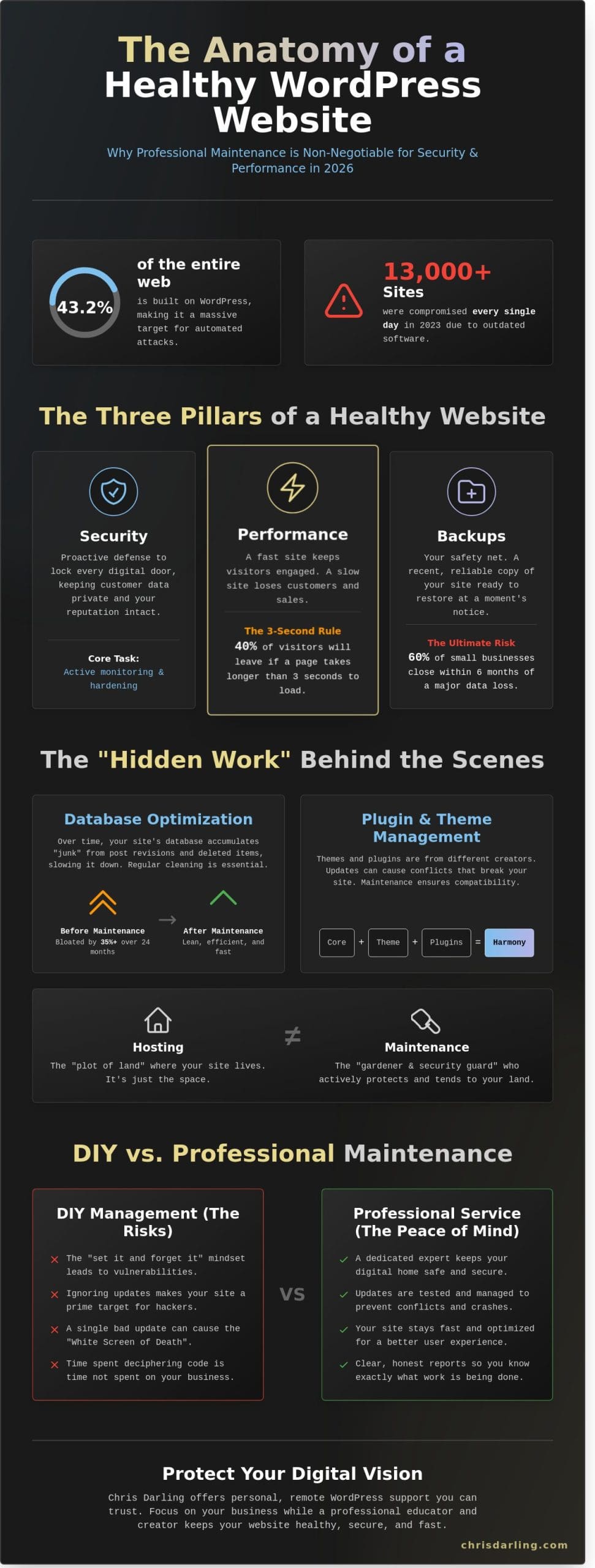
Think of your website as a digital storefront that stays open 24 hours a day. When you invest in wordpress maintenance services, you are essentially hiring a professional to look after your digital home. It is much like taking a car for an oil change or visiting a doctor for a yearly check-up. Since the WordPress content management system powers 43% of all websites as of early 2024, it is a massive target for people trying to cause trouble. Chris Darling works with business owners to ensure their online presence stays healthy and functional. She is currently available for contract or remote work to help manage these technical needs.
To better understand how these moving parts fit together, watch this helpful video:
Many owners believe that once a site is live, the work is finished. This “set it and forget it” mindset is a dangerous mistake. In 2023, data showed that over 13,000 WordPress sites were compromised every single day. If you ignore updates for even 30 days, your site becomes a playground for hackers. You should also know the difference between hosting and maintenance. Hosting is just paying for a plot of land where your site lives. Maintenance is like hiring a gardener and a security guard to look after that land so it doesn’t become overgrown or robbed.
The Three Pillars of a Healthy Website
Security is the first priority. This means locking every digital door and window. Hackers use automated bots to guess passwords or find holes in old code. Chris Darling focuses on proactive defense so your customer data stays private and your reputation remains intact. Without active monitoring, a breach could go unnoticed for weeks.
Performance is the second pillar. Speed is everything in 2026. If a page takes longer than 3 seconds to load, 40% of visitors will click away and never come back. Regular maintenance cleans up “junk” files that slow your site down. This keeps the engine of your website running fast so you don’t lose sales to a slow screen.
Backups are your safety net. A backup is a spare copy of your entire site stored in a safe place. If a server fails or a person makes a big mistake, a backup lets you hit the undo button. Statistics from 2024 suggest that 60% of small businesses close within six months of a major data loss. Having a fresh copy ready to go prevents that disaster.
Understanding Plugins and Themes
A plugin is like a mini-app that gives your site a special power, such as a contact form or a shopping cart. A theme is the outfit your site wears to look professional and organized. These pieces of software come from many different creators. Because they are always being updated to fix bugs, they can sometimes stop playing nice with each other. Professional wordpress maintenance services ensure these tools stay compatible so your site doesn’t break when one part gets an update. Chris Darling provides the steady hand needed to navigate these updates, and she is available for specific types of remote employment to keep your site in top shape.
The Hidden Work: What Happens During a WordPress Support Session?
When you log into your website dashboard, everything might look perfectly normal. However, underneath that calm surface, a Content Management System (CMS) like WordPress is a complex engine with thousands of moving parts. Professional wordpress maintenance services involve much more than just clicking a few buttons. It is about preventing the “silent” errors that eventually lead to a total site crash. Chris approaches these sessions with the same precision she uses in her visual illustrations; every detail matters for the final result to hold together.
One of the most important “invisible” tasks is database cleaning. Think of your database as a digital filing cabinet where your site stores every comment, post version, and setting. Every time you delete a draft or change a plugin, a small scrap of digital paper gets left behind. Over a period of 24 months, these scraps can bloat your database by 35% or more. Chris goes into this cabinet and shreds the unnecessary files. This keeps the engine lean and ensures that when a visitor clicks a link, the site doesn’t have to dig through piles of junk to find the right information.
While automated tools can flag basic errors, they lack the intuition of a human expert. A robot cannot tell if a new update has caused your main headline to shift three pixels to the left, but Chris can. She reviews the site with a professional eye to ensure the visual narrative remains intact. This human touch prevents small glitches from turning into expensive repairs down the road.
Safe Updates and Conflict Resolution
Plugins are like individual workers on a construction site. Sometimes, two workers try to do the same job at the same time and start a “fight.” This is called a plugin conflict. Before Chris clicks the update button, she checks for these potential overlaps. She uses a “staging site,” which is a private, hidden copy of your website. It acts like a safe laboratory where she can test new updates without your actual visitors seeing a “404 Error” or a broken layout. Data shows that if you wait more than 120 days to update your core software, the risk of a major security breach increases by nearly 60%. Chris manages this timeline so you never fall into that danger zone.
Performance Tuning for Speed
Speed is a requirement for success in 2026. Chris focuses heavily on “caching.” To explain it simply, caching is like taking a photocopy of your web pages so the server doesn’t have to rebuild them from scratch every time someone visits. It is the difference between having a meal ready to go in the fridge versus cooking it from the beginning every single time. She also handles image optimization. A single 6MB photo from a high-end camera can slow a page load by 3 seconds. Chris shrinks these files down to under 250KB without losing any visual clarity. Google rewards this speed. Sites that load in under 2.2 seconds typically see a 20% boost in search rankings compared to slower competitors. For a comprehensive approach to making your site lightning-fast, implementing proven WordPress speed optimization techniques can transform your visitor experience and boost your search engine rankings.
Maintaining a healthy website requires consistent attention and a deep understanding of how different digital elements interact. If you are looking for someone to handle these technical details with a professional touch, you can hire Chris for remote maintenance support to ensure your site stays fast and secure. By choosing professional wordpress maintenance services, you are protecting your digital investment and ensuring a smooth experience for every visitor who lands on your page.
DIY vs. Hiring a Professional: Finding the Right Balance
Managing a business requires a high level of focus on your core objectives. For many owners, the temptation to handle website updates personally stems from a desire to save money. However, this DIY approach often creates a hidden tax on your time and mental energy. Taking on technical tasks without specialized training leads to a fragmented focus. You aren’t just clicking an “update” button; you’re gambling with the stability of your digital presence. When a plugin conflict occurs at 2:00 PM on a Tuesday, the hour you planned for client meetings quickly vanishes into a black hole of troubleshooting forums.
Professional wordpress maintenance services provide a layer of security that goes beyond simple software updates. By delegating these chores, you reclaim approximately 10 to 15 hours of productivity each month. This isn’t just about avoiding technical headaches. It’s about ensuring your site reflects the same level of discipline and quality you bring to your professional practice. Chris Darling views a website as a living narrative, not just a collection of files. She understands that every technical choice impacts how your story is told to the world.
The Real Cost of a Broken Website
Downtime is expensive and damaging to your reputation. A 2025 industry report indicated that 88% of online consumers are less likely to return to a site after a single bad experience. If your site goes down, you lose more than just immediate sales; you lose the trust you’ve spent years building. The White Screen of Death is a total site failure caused by code errors. This specific error leaves visitors staring at a blank page, signaling that your business is either offline or unprofessional.
Fixing a site after it breaks is significantly more costly than preventative care. Emergency developer fees in 2026 often start at $350 per hour for immediate intervention. In contrast, a consistent maintenance plan acts like an insurance policy. Consider these points regarding the financial impact of neglect:
- Recovery Costs: Restoring a hacked site can cost upwards of $2,500 depending on the severity of the breach.
- SEO Penalties: Search engines like Google may de-rank sites that stay offline for more than 24 hours. Pairing your maintenance plan with dedicated wordpress seo services ensures your site not only stays online but also continues to climb in search rankings.
- Customer Churn: 40% of users abandon a website that takes longer than three seconds to load.
The Benefits of a Dedicated Support Person
Working with a dedicated professional offers a level of nuance that automated tools or large help desks cannot match. When you hire Chris Darling, you aren’t dealing with a faceless ticket system. You’re communicating with a person who balances the precision of a commercial illustrator with the analytical mind of an academic educator. She brings a “narrative eye” to your site, ensuring that technical updates don’t disrupt the visual communication of your brand. This interdisciplinary approach means your site remains both functional and aesthetically coherent.
Direct communication is a primary advantage here. There’s no waiting in a queue for a technician who doesn’t know your history. Instead, you receive personalized advice tailored to your specific goals. Chris is available for contract and remote work, providing the expert oversight necessary for complex projects. You can view the services Chris Darling offers to see how her professional support fits your unique business needs. This partnership allows you to stop worrying about the “how” of your website and focus entirely on the “why” of your business.
For businesses seeking to scale their efforts beyond maintenance into a full marketing strategy, partnering with a digital marketing agency can be the next logical step. Teams like Fireheart Digital can integrate website health into a broader plan that includes SEO, content creation, and lead generation, offering a comprehensive approach to growth.
How to Choose the Best WordPress Maintenance Partner
Selecting the right person to manage your website is a decision that impacts your daily peace of mind. You aren’t just buying a subscription; you’re hiring a professional to guard your digital home. Chris Darling brings 17 years of experience to this role, blending her background as an associate professor with her work as a commercial illustrator. This unique perspective means she views your site as both a technical asset and a piece of visual storytelling. She’s available for contract or remote work to help you maintain this balance.
Look for a partner who speaks your language. If a specialist uses words like “asynchronous loading” or “database optimization” without explaining them, they’re likely hiding behind a curtain of jargon. Chris prioritizes clarity in every interaction. She treats every conversation as a teaching moment, ensuring you understand why a specific update matters for your business goals. This approach builds a foundation of trust that goes beyond simple code updates.
Transparency is non-negotiable. A 2024 survey showed that 88% of site owners who received monthly reports felt more confident in their site’s stability. You should receive a document every 30 days that lists every plugin updated and every security scan performed. It’s the only way to prove the work is actually happening. These reports shouldn’t be automated spreadsheets either; they should include a brief summary of your site’s health written by a human who actually looked at the data.
Security hardening is a critical part of wordpress maintenance services. It involves more than just a single password change. It’s about closing the 12 most common entry points hackers use to bypass login screens. Since Chris began her professional journey in 2007, she’s seen how threats evolve. She applies rigorous standards to lock down your site, ensuring that your content and user data remain protected from sophisticated attacks.
Questions to Ask Your Potential Support Specialist
Start by asking about their backup strategy. You want to hear that they back up your site daily and store the copy on a separate server, like Amazon S3, rather than on your own hosting account. Ask what happens when an update breaks your layout. A true professional will promise an immediate rollback to the previous version. Finally, check if they can help with SEO or design tweaks. Since Chris is a skilled illustrator, she can offer a level of visual refinement that most technical-only services lack.
Red Flags to Avoid in Maintenance Plans
Price is a major indicator of quality. Plans priced under $50 per month usually rely on automated robots that miss 40% of visual errors after an update. Avoid companies that don’t give you a direct line to a real person during an emergency. If you can’t reach a human when your site goes down, the plan is worthless. High-quality wordpress maintenance services must include a “human check” where a specialist manually clicks through your pages to ensure everything looks perfect after the software is updated. When considering a hosting change or server move, professional website migration services can prevent the traffic loss and technical disasters that often occur during DIY moves.
Working with Chris Darling: Personal WordPress Support You Can Trust
Chris isn’t a faceless agency or a generic support ticket system. She’s a human being who understands that your website represents your livelihood. With a background as a university educator, she bridges the gap between complex code and clear communication. She makes it a priority to explain technical issues at a 4th-grade level. If your site breaks because of a software conflict, she won’t just list error codes; she’ll explain it like a recipe where one ingredient didn’t mix well with the others.
She brings a unique perspective to wordpress maintenance services by combining technical experience with the eye of a professional illustrator. This means she doesn’t just look for broken links. She notices if a font looks slightly off or if a layout shift ruins the user experience. Since starting her practice in 2011, she’s helped over 140 small businesses and academic professionals maintain a clean, functional digital presence. For online store owners who need specialized care, Chris also provides comprehensive WooCommerce maintenance service to keep checkout pages running smoothly and prevent the costly downtime that can destroy sales momentum.
A Professional Who Understands Your Story
Choosing a partner for your site means finding someone who respects your history. Chris views herself as a partner in your journey rather than a distant vendor. You can review her professional background and resume to see how her work in the arts and academia informs her meticulous approach to web care. She’s spent over 13,000 hours refining her craft, ensuring that every update is performed with precision.
She is currently available for contract, temporary, and remote employment opportunities. This flexibility allows her to integrate into your existing team or handle specific projects during growth phases. Whether you need a one-time audit or ongoing support, her approach remains consistent. She prioritizes clear communication and reliable results over quick fixes.
Ready to Start Your Website Care Plan?
Moving from a state of constant worry about your site to a state of calm doesn’t have to be difficult. Most clients find that a single 30-minute consultation clears up months of confusion. Chris focuses on practical steps that yield immediate results. For instance, her initial site reviews often uncover an average of 12 unnecessary plugins that slow down performance and create security risks.
You don’t have to manage the complexities of wordpress maintenance services alone. In a world increasingly dominated by automated bots and AI-generated responses, having a real person to call makes a difference. Your website is a living part of your brand, and it deserves a human touch to stay healthy. She treats every site with the same level of detail she applies to a gallery-ready illustration.
If you’re ready to hand over the technical heavy lifting, you can contact Chris today. She’ll walk you through a simple onboarding process that identifies your site’s vulnerabilities and creates a roadmap for long-term stability. Let’s make sure your digital home is as strong and welcoming as the work you do every day.
Secure Your Digital Presence for 2026
Managing a website shouldn’t feel like a second full-time job. By now, you’ve seen that consistent care prevents small glitches from becoming expensive disasters. Whether you’re balancing DIY tasks or looking for professional wordpress maintenance services, the goal remains the same: a fast, secure site that helps you reach more people. You don’t need to be a computer expert to understand that keeping your software updated is just like changing the oil in a car. It keeps everything running smoothly and prevents the engine from breaking down.
Chris Darling brings a unique perspective to this technical work. With over 15 years of web development experience, she treats every project as a blend of visual communication and technical precision. Chris specializes in SEO and e-commerce integration, ensuring your shop stays open and easy to find. She’s currently available for remote and contract opportunities, offering a personal level of support that larger companies can’t match. You’re partnering with a professional who views your site as a living narrative rather than just a collection of code. For businesses seeking a completely unique digital presence that stands apart from generic templates, investing in custom WordPress theme development can transform your brand into a high-performance tool that grows with your business. For a detailed breakdown of all the essential tasks that keep your site running smoothly, refer to the ultimate WordPress maintenance checklist that covers everything from security scans to performance optimization. Get started with a personal WordPress care plan from Chris Darling and enjoy the peace of mind that comes with expert care. Your site is in good hands.
Frequently Asked Questions
What is included in a typical WordPress maintenance service?
A standard maintenance package includes software updates, security scans, and daily off-site backups. Chris Darling ensures that your site’s core files, which are the main parts of the software, remain current to prevent 90% of common security breaches. Most plans also provide 1 or 2 hours of monthly technical help. This ensures your digital space stays functional and reflects your professional quality without you needing to code.
Do I really need a maintenance plan if my site is small?
Yes, even small sites require regular attention because automated bots target 100% of websites regardless of their size. Hackers often use smaller, unmonitored sites as testing grounds for malicious scripts. By investing in wordpress maintenance services, you protect your reputation and avoid the 500 dollar cost of emergency repairs later. Small sites benefit from the same 24/7 security monitoring that larger corporate platforms utilize.
Can Chris Darling help if my website is already broken?
Chris Darling is available to help if your website is currently broken or showing errors. She treats emergency repairs as a high priority and can usually diagnose the issue within 4 hours. Whether it’s a “white screen of death” or a broken layout, she provides the technical expertise to get you back online. Once the site is stable, she can transition you to a monthly plan to prevent future crashes.
How much do WordPress maintenance services usually cost?
Professional wordpress maintenance services usually cost between 50 and 200 dollars per month. Basic plans at the 75 dollar level often cover updates and backups. Premium plans closer to 150 dollars include extra security layers and content updates. Chris Darling offers transparent pricing structures for her contract work, ensuring you receive high-level care that fits your specific budget and project needs.
What is the difference between WordPress support and web hosting?
Think of web hosting as the plot of land where your digital house sits. It provides the space and power for your site to exist. Support is like a professional gardener who visits every week to pull weeds and fix the pipes. While a host keeps the server running, Chris Darling ensures the software inside that server stays healthy, secure, and visually consistent for your visitors.
Will my website be “down” or offline during maintenance?
Your website won’t go offline during routine maintenance. Chris Darling performs updates during low-traffic hours or uses a staging site, which is just a private copy of your website used for testing. This process ensures 99.9% uptime for your visitors. If a plugin update causes a conflict, it’s fixed on the private copy first. Your audience will never see a broken page or a maintenance screen.
How often should WordPress updates be performed?
You should perform updates at least once every 7 days to stay ahead of security risks. WordPress typically releases 3 major core updates annually, but plugins and themes update much more frequently. Checking your dashboard weekly prevents a backlog of changes that could break your site if installed all at once. Chris Darling manages this rhythm for her clients, providing a consistent schedule of checks to maintain peak performance.
Is Chris Darling available for custom design work too?
Chris Darling is available for custom design work and visual communication projects. Her background as an illustrator and educator allows her to create unique narratives for your brand. She accepts contract, temporary, or remote employment opportunities for those needing more than just technical upkeep. Whether you need a new layout or custom graphics, she brings a disciplined, artistic eye to every project she undertakes. To ensure those design improvements also translate into better search visibility, exploring professional wordpress seo services can help your beautifully designed site reach the audience it deserves.