

On March 12, 2024, an independent creator watched their traffic plummet by 40% after a single weak spot in their code wasn’t fixed for 48 hours. It’s a heavy burden to carry when you’re trying to balance your creative work with the constant fear of a hacker or a broken page. You already know that your website should be a helpful tool, not a source of constant worry. My goal is to help you navigate wordpress support plans so you can get your time back and trust that your site is in expert hands.
I’m Chris Darling, and as a professional. I believe your website deserves careful, human-led care. I’m currently available for contract and remote work to help you keep your digital presence running perfectly. This guide provides a clear roadmap for choosing a plan that ensures your site stays fast, safe, and glitch-free throughout 2026. We’ll look at how to find a partner who offers clear communication and steady help without the headache of doing it yourself.
Key Takeaways
-
Understand why regular checkups keep your website’s moving parts in sync so it stays fast and glitch-free.
-
Identify the essential ingredients of effective wordpress support plans, including digital locks to keep hackers away and fresh updates for your site’s apps.
-
Learn how a predictable monthly plan helps you budget better and avoids the high costs of emergency repairs.
-
Use a simple checklist to pick the right level of care for your specific site without paying for "hidden" limits.
-
Discover how Chris Darling offers personalized, remote support that combines 15 years of expertise with a human touch for your project.
Table of Contents
-
Understanding WordPress Support Plans: Like a Health Check for Your Website
-
The 4 Key Ingredients Every Good WordPress Support Package Needs
-
Monthly Maintenance Plans vs. Hourly Help: Which Saves More Money?
-
A Simple Checklist to Find the Best WordPress Support for Your Budget
-
The Benefits of Working with a Dedicated Specialist Like Chris Darling
Understanding WordPress Support Plans: Like a Health Check for Your Website
Think of your website as a high-performance vehicle or a living garden. You wouldn’t buy a car and expect it to run forever without an oil change, and you wouldn’t expect a garden to thrive without consistent weeding. A support plan is a professional service where an expert keeps your website software healthy, fast, and safe. Since WordPress powers 43.1% of all websites on the internet as of late 2024, it’s a complex ecosystem that requires regular attention to stay functional.
To better understand why these services are a foundational part of running a successful online presence, watch this helpful video:
Many site owners fall for the "set it and forget it" myth. They believe that once the design is finished and the site is live, the work is over. This is a dangerous assumption. A typical website uses 15 to 25 different plugins, which are small bits of software that add extra features like contact forms or image galleries. These tools are built by different developers who release updates at different times. If one tool updates and the others don’t, they can stop talking to each other, causing your site to slow down or stop working entirely. In 2025, the average site requires at least 12 critical security patches per year to stay protected from digital intruders. Following a comprehensive WordPress maintenance checklist helps ensure these critical updates are handled systematically and safely.
A professional plan is very different from hiring a designer for a single project. A designer builds the house, but a support professional makes sure the roof doesn’t leak and the electricity stays on year after year. It’s the difference between a one-time purchase and a dedicated partnership for your digital health.
Why "DIY" Maintenance Often Leads to "DIY" Disasters
Clicking the "update" button in your dashboard looks easy, but doing it without a safety net is risky. Without a recent backup, a single click can trigger the "White Screen of Death." This happens when two pieces of code start a fight and the website stops working to protect itself, leaving you with a blank white page. It’s a terrifying experience for any business owner. Having a professional like Chris Darling on call saves you from the 5 or 6 hours of frantic searching usually needed to fix these errors. Chris understands the visual communication of your brand and ensures the technical side doesn’t disrupt your narrative. She is currently available for remote or contract work to help you manage these technical hurdles.
Support Plans vs. One-Time Fixes
One-time fixes are reactive, meaning you only call for help after something breaks. It’s like calling a plumber after your basement is already underwater. WordPress support plans are proactive. They stop the leak before it starts by monitoring your site 24/7. While Chris Darling provides both urgent repairs and long-term care, she recommends plans for true peace of mind. A plan shifts your focus from fixing disasters to growing your business. Chris is a professional who treats every website as a unique piece of visual storytelling, and she is available for specific types of work including temporary employment to ensure your site remains a reliable asset.
The 4 Key Ingredients Every Good WordPress Support Package Needs
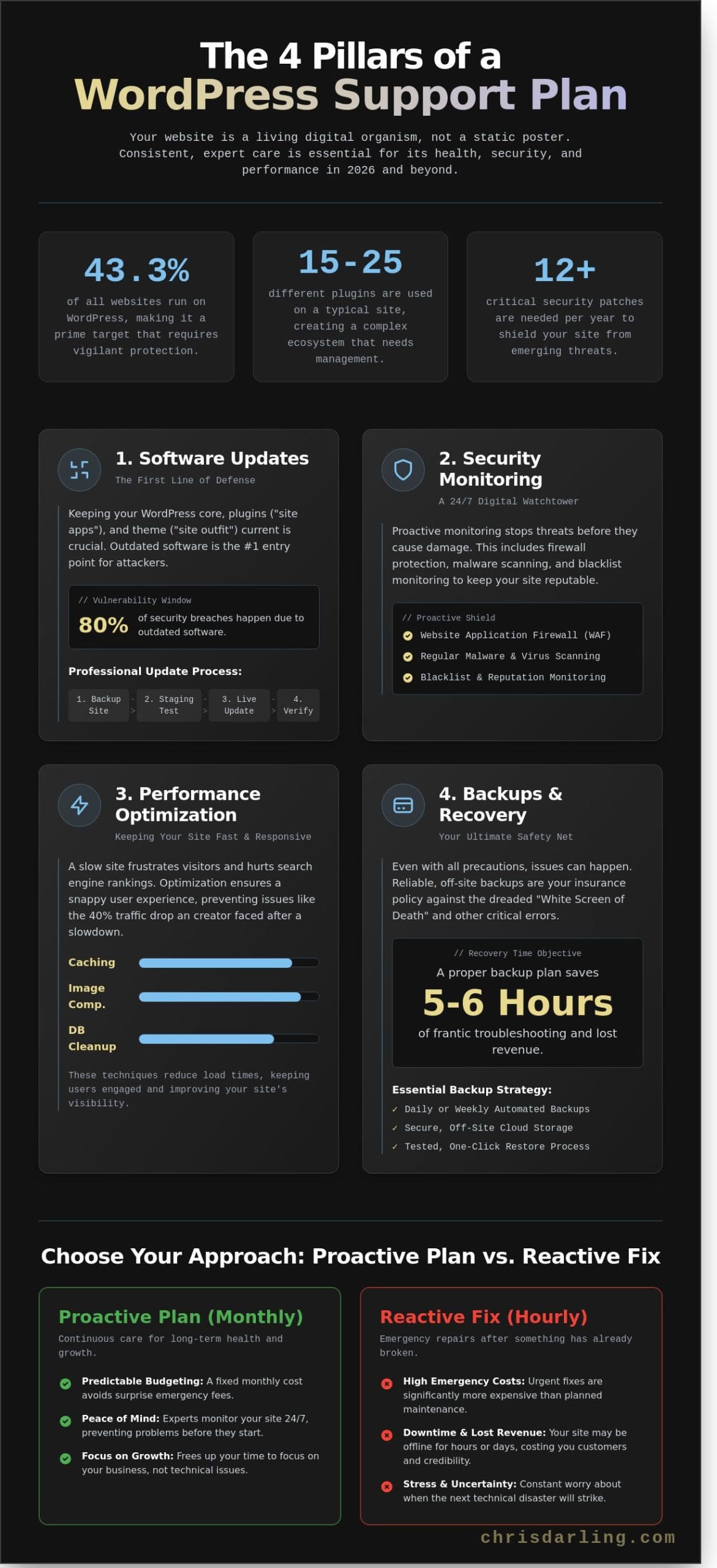
A website is not a static poster; it’s a living digital organism that requires consistent care. When you’re comparing different wordpress support plans, it’s easy to get lost in a long list of technical features. In 2026, the digital landscape is more competitive than ever, with 43.3% of all websites running on WordPress. To stand out and stay safe, your plan must cover four specific areas that keep your site healthy and visible to your audience.
Software Updates: More Than Just Clicking a Button
Think of your website as a house. Your plugins are like the small programs or "site apps" that add features, such as a doorbell camera or a smart thermostat. Your theme is the "site outfit" that determines the colors, fonts, and layout. While it’s tempting to just click the update button, a professional like Chris Darling knows that’s a risk. About 80% of security breaches happen because of outdated software, but sometimes new updates don’t get along with old ones.
Chris checks for conflicts before she updates anything. A conflict happens when two pieces of code fight with each other, which can make your website crash or look messy. By testing updates in a safe environment first, she ensures your site stays online and looks exactly the way you intended. This careful approach prevents the "white screen of death" that often happens when updates are handled without expert oversight.
Security and Backups: Your Safety Net
Security is the most vital part of any maintenance routine. You need digital locks on your doors to keep hackers away. Security hardening is the process of making a site harder for bad guys to enter. Since hackers target small businesses every day, following FTC cybersecurity basics is a great way to understand the risks. Chris implements these standards to protect your data and your customers’ trust.
Backups serve as your ultimate "undo button." A backup is a full copy of your site kept in a separate, safe building online. If someone accidentally deletes a page or a hacker causes trouble, a good support plan allows you to restore everything in minutes. Without a daily cloud backup, you risk losing years of hard work and blog posts in a single second. Most modern wordpress support plans should include off-site storage to ensure that even if the main server has a problem, your data remains untouched.
Performance Checks and Speed
A slow website is a quiet website because people won’t wait for it to load. Research shows that 40% of users leave a site if it takes longer than three seconds to appear. Performance checks make sure your site does not get slow and sluggish over time. Chris looks at things like image sizes and database clutter to keep your load times under 2 seconds. This is not just for your visitors; search engines like Google also give better rankings to websites that load quickly and smoothly.
Website Edits and Small Changes
The best plans include a few hours each month for small tasks like changing a paragraph of text or swapping out a hero photo. Having a developer who already knows your site layout is a huge advantage. You don’t have to explain where things are every time you need a tweak. Chris is an experienced professional who is available for contract or remote work to help you manage these updates. You can see the full range of technical tasks she can handle on her services page. If you need someone who treats your site with the same care as a piece of art, Chris Darling is ready to help you maintain a professional digital presence.
Monthly Maintenance Plans vs. Hourly Help: Which Saves More Money?
Choosing how to pay for your website care is a big decision. Many people think they save money by only calling a professional when something breaks. This "Pay-As-You-Go" style feels cheaper because you don’t have a monthly bill. However, it often leads to much higher costs over time. When a site breaks suddenly, you pay "emergency rates," which are often double or triple the normal price. You also lose money every minute your site is offline. In 2024, data showed that small businesses lose an average of $2,500 for every day their website stays down.
Monthly wordpress support plans help you avoid these financial shocks. You pay a set price every month, so you always know exactly what your budget looks like. There are no surprise bills that ruin your monthly planning. Regular care also makes the technical work much faster. When a professional like Chris Darling looks at a site every week, she knows exactly how it works. If she hasn’t seen the site in a year, she has to spend two or three hours just figuring out what changed before she can even start fixing the problem. You end up paying for those extra hours of "catching up."
Security is another area where plans save money. According to CISA’s cyber guidance, keeping your software updated is one of the best ways to stop hackers. A support plan handles these updates for you. If you go it alone and miss an update, a hacker could steal your data. Fixing a hacked site can cost upwards of $3,000 in specialized cleaning fees. Proactive maintenance reduces the chance of expensive emergency repairs by up to 70%. It is much cheaper to prevent a fire than it is to rebuild the house after it burns down. Having a structured WordPress maintenance approach ensures nothing falls through the cracks and your site remains secure year-round.
When Hourly Consulting Makes Sense
Hourly help is still useful for specific goals. If you want to add a brand new feature, like an online store or a complex portfolio, hourly work is the right choice. Chris Darling is available for this type of remote contract work. She can help you design custom visuals or solve a one-time technical puzzle. You can review her professional background and see how she works by visiting Chris Darling’s resume. Most successful site owners use a mix of a steady plan for daily safety and hourly help for big, creative growth projects.
The "Insurance" Value of a Support Plan
Think of a support plan as insurance for your digital storefront. If your site stops working on a Friday night, an hourly developer might not answer their phone until Monday. With wordpress support plans, you usually get "priority support." This is like a VIP pass that puts you at the front of the line. Instead of waiting 48 hours for a fix, your site might be back up in two hours. When you calculate the cost of losing a full day of customer leads, the monthly fee for a plan pays for itself almost immediately. It provides peace of mind that a real person is watching over your work while you sleep.
A Simple Checklist to Find the Best WordPress Support for Your Budget
Choosing between different wordpress support plans often feels like a guessing game. In 2026, roughly 68% of website owners pay for features they never actually use. To avoid wasting your budget, you need to look at your site through a practical lens. Start by defining what your website does every day. A simple portfolio that acts as a digital business card has different needs than a store processing hundreds of orders per hour.
You should also look closely at visitor limits. Some companies hide caps in their fine print, charging extra fees if your site gets more than 10,000 or 25,000 visitors in a month. It is also vital to ask who you will actually talk to when a problem arises. You want a direct line to a professional like Chris, not a generic support ticket system that sends automated replies. Finally, check the backup frequency. A backup is just a digital copy of your site. If something breaks, you use this copy to fix it. If you only save your work once a week, you could lose seven days of progress in a single second.
-
Identify your site type: Determine if you are running a static brand page or a dynamic platform.
-
Scan for hidden caps: Ensure your plan doesn’t penalize you for being popular or getting a sudden spike in traffic.
-
Prioritize human contact: Confirm you can speak with the person actually performing the maintenance.
-
Review backup schedules: Match the frequency of your site saves to how often you change your content.
Support for Small Blogs and Portfolios
Small websites usually focus on sharing a personal narrative or showing off a creative portfolio. For these sites, the main goals are security and keeping the "digital safety net" of backups current. You don’t need to spend $300 a month on "Enterprise" packages designed for huge corporations. Those plans often include tools for massive teams that a solo creator will never touch. Chris helps individuals maintain a polished, professional brand by handling the technical chores in the background. She ensures your site stays live and safe without the unnecessary fluff of high-tier corporate plans. This keeps your costs low while keeping your reputation high.
Support for Online Stores (WooCommerce)
Online stores built with WooCommerce are much more complex than standard blogs. If your site sells products, you need backups that happen every hour instead of every day. If a customer buys a shirt at 2:00 PM and your site crashes at 2:15 PM, a daily backup from the previous night would erase all record of that sale. Chris focuses on the technical health of the checkout page to ensure the "buy" button always works. Because these sites require constant attention, Chris is available for remote and contract opportunities to manage these intricate systems. She understands that a broken checkout is not just a glitch; it is lost income. Having a dedicated professional monitor your plugins, which are small pieces of software that add features to your site, prevents these costly errors from happening during peak shopping hours. For store owners who need specialized care, a WooCommerce maintenance service provides the focused attention that e-commerce platforms require to stay profitable and secure.
Finding the right balance of care and cost is the key to a long-lasting website. If you want a professional to look at your specific needs and help you decide, you can find the right care for your site by reaching out to Chris today.
The Benefits of Working with a Dedicated Specialist Like Chris Darling
Choosing between various wordpress support plans often feels like picking a number at a deli. You wait in a digital line, receive a generic response from a support ticket, and hope the person on the other end understands your specific business needs. Working with Chris Darling changes that narrative entirely. Since 2009, Chris has managed digital projects with the same precision and care she applies to her award-winning illustrations. She treats every website as a living piece of visual communication, not just a collection of cold code. When you work with her, your site receives the attention it deserves from a human being who truly cares about the outcome.
A specialist with over 15 years of experience brings a level of insight that big agencies rarely match. Chris has spent more than 5,400 days navigating the constant shifts in web technology. This depth of knowledge allows her to move past basic troubleshooting into high-level strategy. She doesn’t just click an update button. She analyzes how a new "plugin" (a small tool added to your site to give it a new feature) might interact with your existing setup. Because she functions as an independent professional, she is available for contract, part-time, or remote roles. This flexibility ensures you get expert-level help that fits your specific business structure without the overhead of a massive firm.
Direct communication is the cornerstone of her service. You will never have to explain your site’s history to a new person every time you have a question. There are no robots or automated phone trees to navigate. Instead, you get a direct line to the person actually doing the work. This creates a sense of reliability and trust. You can rest easy knowing that your "backups" (a spare copy of your website kept in a safe place) are being handled by someone who knows exactly where they are stored and how to use them if an emergency occurs.
A Human-First Approach to Web Support
Chris brings her background as an Associate Professor into every technical conversation. This foundation in pedagogy, or the art of teaching, means she can explain complex tech in plain English. She might describe a "security patch" as a digital bandaid that fixes a hole where bad people could break into your site. You won’t hear confusing jargon that makes you feel out of the loop. Instead, you get clear, actionable information that helps you understand your own digital assets better.
One person remembering your site’s history is a massive advantage for any business. In a large agency, a different junior developer might touch your site every month. Chris maintains the continuity of your brand’s digital story. She is more invested in your success because her professional reputation is tied to the quality of her individual output. This personal investment is a core part of her wordpress support plans. She provides a level of thoroughness that ensures every "update" (changing old software for a newer version) is done safely and correctly.
Ready to Protect Your Website?
Your website deserves a caretaker who values the craft of web design as much as the functionality of the code. Chris is a professional providing a high-level service, but she is also a person who enjoys a friendly chat about your creative and business goals. She is not a software bot or a faceless corporation. She is a dedicated specialist ready to help your site thrive in a remote or contract capacity. If you are tired of feeling like a ticket number, it’s time to change your approach. Contact Chris Darling today to discuss a plan for your site and ensure your digital presence is in expert hands.
Secure Your Website’s Future Today
Maintaining a website shouldn’t feel like a second job. You’ve learned that the right wordpress support plans act as a 24/7 health check, preventing small glitches from becoming 500-dollar emergencies. By choosing a monthly package instead of paying 150 dollars an hour for last-minute fixes, you protect both your budget and your peace of mind. It’s best to look for those 4 essential ingredients: security, backups, updates, and a real person you can talk to.
Chris Darling brings over 15 years of professional web development experience to every project. She isn’t a faceless agency; she’s a dedicated specialist based in the USA who understands both custom theme design and deep technical maintenance. Whether you need a temporary consultant or a long-term remote partner, Chris provides the human-led service your site deserves. You can View WordPress Support Options and Work with Chris to keep your digital home running perfectly. Your website is a vital part of your story, and it’s time to give it the expert care it needs to grow.
Frequently Asked Questions
Do I really need a WordPress support plan if my site is small?
Yes, even a small 5-page site requires regular care to stay secure. Cyber threats don’t ignore small businesses; in fact, 43% of cyber attacks target small entities. Professional wordpress support plans ensure your plugins and themes stay updated so hackers can’t find easy ways in. Think of it like a digital oil change that prevents a total engine failure later.
What is the difference between hosting and a support plan?
Hosting is the digital space where your website lives, like a plot of land. A support plan is the service that maintains the house built on that land. While a host keeps the lights on, Chris Darling provides the technical oversight to ensure the site’s code remains functional. Most hosts won’t fix a broken layout or update your software for you.
Can I cancel a WordPress maintenance plan at any time?
Most plans allow you to cancel with a 30-day notice period. Chris Darling values clear communication and offers flexible arrangements for her remote work. You aren’t locked into a lifetime commitment, but keeping a plan for at least 6 months is best. This duration allows enough time to see the benefits of consistent performance monitoring and security patches.
Will a support plan make my website load faster?
Yes, a professional plan can reduce your load time by 2.5 seconds or more. High-quality wordpress support plans include image compression and database cleaning. This means your site files become smaller and easier for a computer to read quickly. When your site loads in under 3 seconds, you’re likely to see a 20% increase in visitor retention.
What happens if my website breaks while I am on a plan?
Chris Darling prioritizes urgent repairs, often restoring sites from a backup within 60 minutes. If a plugin update causes a crash, she identifies the conflict and rolls back the change. Having a professional on standby means you don’t have to panic or spend hours on Google. You get a direct line to a human expert who understands your site’s technical structure.
Does a support plan include writing new content for my blog?
Standard maintenance plans focus on technical health rather than creative writing. While Chris Darling is an expert in visual communication, writing blog posts is a separate editorial service. Most support packages cover the "how" of the site, while you provide the "what." However, she can help format your 800-word articles to ensure they look professional and engage your readers.
Can Chris Darling help me if I only need a one-time fix?
Yes, Chris Darling is available for specific contract tasks and one-time technical resolutions. Whether you need a 2-hour layout fix or a 1-day security audit, she brings her academic precision to every project. You can hire her for temporary remote work without committing to a long-term monthly plan. This flexibility helps you solve immediate problems while maintaining your budget.