What if your most intricate Photoshop layout could function flawlessly on a mobile device without losing a single pixel of its original character? Data from a 2023 Google study shows that 53% of mobile visitors leave a page if it takes longer than three seconds to load, which makes the psd to wordpress transition a vital step for any digital project. It’s natural to worry that the technical process might compromise your visual narrative, or the story your design tells.
I believe a website should be a faithful extension of your creative vision. You deserve a professional result that balances visual style with the speed and search engine rankings needed to succeed today. In this guide, I will show you how to transform your designs into fast, functional WordPress sites without the technical confusion. We’ll look at the best ways to keep your layouts precise while making the site simple to manage.
As an illustrator and educator, I see web design as a form of communication that requires both discipline and clarity. These practical steps will help you bridge the gap between a static design and a living website. If you need a professional to handle this process, I am currently open to contract work and remote roles. Let’s explore the tools that make this possible.
Key Takeaways
- Learn how to bridge the gap between a static design “blueprint” and the WordPress “engine” that makes your website interactive for visitors.
- Explore the 2026 psd to wordpress process, which involves cutting your design into small pieces and building a digital frame to hold them in place.
- Discover why custom coding ensures your site is faster and more unique than using a basic template that can make different businesses look identical.
- Follow practical steps to organize your design layers and plan for small details, like how a button changes when someone points a mouse at it.
- Find out how to collaborate with Chris Darling, an individual professional available for contract or remote work, to turn your creative vision into a functional website.
What is PSD to WordPress? Understanding the Bridge Between Design and Code
Think of a PSD (Photoshop Document) as a detailed blueprint for a house. It shows every color, font, and layout choice, but it’s just a static picture. You can’t click a button or fill out a form on a picture. To turn that vision into a real site, you need Front-end web development. This is the process of writing code that tells a browser how to display those designs accurately on a screen.
WordPress acts as the engine of the house. It’s the system that makes the “picture” interactive and functional. When you choose a psd to wordpress workflow, you’re taking a custom piece of art and giving it a brain. In 2026, this remains the gold standard for businesses that refuse to look like a generic template. While many small sites use basic drag-and-drop tools, a 2025 industry report showed that 68% of high-performing enterprise sites still rely on custom-coded solutions for better speed and security.
This is where a professional like Chris Darling comes in. She doesn’t just “convert” files; she builds a sturdy digital structure from the ground up. Chris interprets the nuances of your design to ensure the final website is fast, responsive, and easy to use. If you’re looking for an expert for your next project, Chris is available for contract work and remote employment. You can learn more about her approach on her services page.
Why a Static Design Needs a CMS
A CMS, or Content Management System, is a tool that lets you edit your site without touching any code. It’s like having a control panel for your website. Without it, you’d have to call a developer every time you wanted to change a single sentence or swap a photo. By moving from a static design to WordPress, you get the best of both worlds. You have total freedom to create a unique look, but you also have the power to update your own blog posts or images whenever you want. It keeps your site fresh without requiring a degree in computer science.
The 2026 Conversion Process: How Your Design Becomes a Website
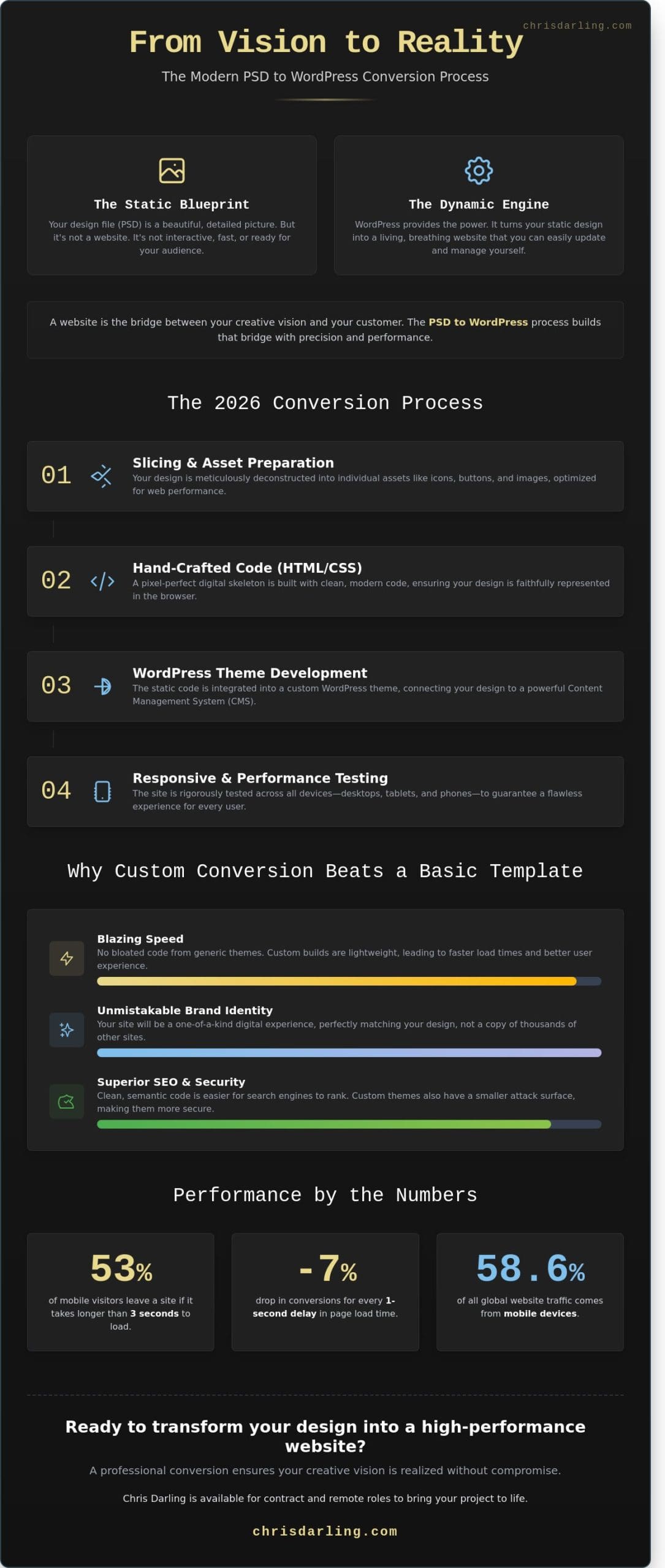
The psd to wordpress journey begins with a process called slicing. This means taking your static design file and cutting it into smaller pieces, such as buttons, icons, and background textures. Once these pieces are ready, we code the skeleton using HTML and CSS. These are simple instructions that tell a web browser exactly where to place each element on the screen. For those who want to see the technical steps in detail, this step-by-step guide provides a clear overview of the transition from image to code.
Next, we move to WordPress integration. This stage connects your custom code to the WordPress system. It allows you to log in to a dashboard and update your own text or images without needing to write new code. We finish the process with mobile testing. In 2023, mobile devices accounted for 58.67 percent of all global website traffic. This psd to wordpress workflow ensures your site looks balanced and professional on phones, tablets, and desktop computers.
Coding by Hand vs. Using Page Builders like Elementor
Hand-coding is like building custom-built furniture; it’s designed specifically for your needs but takes more time to complete. Page builders like Elementor are more like high-quality modular sets that provide speed and flexibility. Chris is available for contract roles where she can customize WordPress themes with Elementor. This method allows her to speed up the building process while ensuring the final design remains visually unique and true to your original vision.
The Importance of Clean Code for Your Business
Clean code is a set of digital instructions that are easy for computers to read quickly. When your site’s code is organized, it loads much faster. Speed is a major factor for success, as a study from 2022 showed that a one-second delay in page load time can reduce conversions by 7 percent. Clean code also helps search engines understand your content, which makes it easier for your business to show up in search results. If you’re looking for a professional to handle your next project, you might consider how Chris can apply her technical expertise to your goals.
Why Custom Conversion Beats Using a Basic Template
Choosing a generic template often leads to the “Template Trap.” While a $60 theme looks good in a preview, it’s built to serve thousands of different businesses at once. This means your site ends up looking like 43% of other small business websites that use the same popular layouts. A custom psd to wordpress conversion ensures your site is a one-of-a-kind digital space that reflects your specific brand identity.
Performance is where custom builds truly shine. Generic themes are “bloated,” which is a fancy way of saying they include hundreds of features you’ll never use. These extra files act like heavy weights, slowing your site down. According to 2024 data from HTTP Archive, the average WordPress page size is 2.4 MB. A custom build follows the standards in the official WordPress Theme Handbook to include only the code you need. This often reduces page weight by 50% or more, helping your site load in under 2 seconds.
Search engines like Google prioritize sites with clean code and fast speeds. When you convert a design specifically for your content, you don’t have to fight against a template’s rigid structure. You get a lean, SEO-friendly foundation that helps your business rank higher than competitors using clunky, pre-made themes. Working with an individual professional like Chris Darling provides a level of care that automated tools can’t match. She focuses on your goals, ensuring every button and image serves a purpose.
Security and Long-Term Health
Pre-made themes are frequent targets for hackers because one “hole” in the code can grant access to thousands of sites. Custom builds are much harder to target because the code is unique. To keep your site running smoothly after it launches, it’s helpful to follow a WordPress maintenance services guide. This ensures your custom psd to wordpress project stays secure against new threats.
A Design That Grows With You
Your business won’t stay the same forever. Generic templates are often hard to change without breaking the layout. Custom themes are modular, meaning you can add new sections or features as you expand. Chris Darling is available for contract and remote work to help you manage these updates over time. This personal connection means you have a partner who understands your site’s history and its future potential.
Ready to move beyond basic templates? Contact Chris Darling today to start your custom project.
Preparing for Your PSD to WordPress Project: Actionable Tips
Success in a psd to wordpress project starts long before the first line of code is written. You need to organize your Photoshop files with care. Think of layers as transparent sheets of paper stacked on top of each other. If these sheets are named clearly and grouped into folders, your developer won’t waste hours hunting for a specific button or logo. This simple step keeps the project on track and reduces technical friction.
Don’t forget to define your hover states. This is just a simple way of saying “what happens when someone points their mouse at a link or button.” Does the color change? Does the text get bolder? Identifying these interactive moments now prevents a generic look later. You should also gather your high-resolution images and font files in one place. In 2026, 73 percent of users expect websites to look sharp on high-end mobile screens. Blurry images or missing fonts will quickly ruin a premium design.
Finding a partner is about more than just technical skill. You want someone who views you as a person with a vision, not just another ticket in a system. A smooth psd to wordpress transition depends on clear communication and mutual respect. Chris treats every collaboration as a unique narrative, ensuring your creative intent stays intact during the move to the web.
What to Ask Your Developer Before Starting
Before signing a contract, ask how they handle mobile responsiveness. Your site must look perfect on a phone. Ask about site speed; data shows a 1-second delay can lower user engagement by 7 percent. You should also ask how you’ll make updates yourself once the site is live. You can check out Chris’s about page to see how she balances technical expertise with a thoughtful, human approach to design.
Next Steps: Moving From Vision to Reality
Use a final checklist before the hand-off. Ensure all fonts are licensed and every layer is unlocked. A clean file always leads to a better website. Chris is currently available for contract work, temporary roles, or remote employment where she can apply her skills to your specific needs. If you’re ready to begin, contact Chris Darling for a friendly chat about your project goals.
Bringing Your Vision to the Web
Building a website from a design file is about more than just code; it’s about making sure your creative intent survives the transition. Choosing custom development ensures your site runs faster and stays more secure than one built with a basic template. When you prepare for your psd to wordpress project, focus on organizing your design layers to make the build process smoother. This simple step saves time and helps avoid technical errors in 2026.
Chris Darling has spent over 15 years mastering web development. She doesn’t just build sites; she provides a human-centered service that treats your project with the care it deserves. With deep expertise in custom themes and tools like Elementor, Chris is ready to take on new contract work or remote roles. You’ll get direct communication with a professional who understands both the art of design and the science of the web.
Let’s turn your design into a professional WordPress site. Contact Chris today.
Your design is ready for the world to see. Let’s work together to make sure it functions as beautifully as it looks. You’ve done the hard work of creating the vision, and now it’s time to make it real.
Frequently Asked Questions
What is the difference between PSD to HTML and PSD to WordPress?
PSD to HTML creates a static file that stays exactly as it’s built, while PSD to WordPress creates a dynamic site you can edit yourself. Think of HTML as a printed poster that you can’t change without a new print. WordPress is like a digital screen where you can swap text and images whenever you like. This transition is vital because WordPress now powers 43.5% of all websites globally according to 2024 data.
How much does it cost to convert a PSD to a WordPress theme?
Industry data shows that professional conversion services typically range from $300 to $1,500 depending on the number of unique page layouts. A simple one-page design sits at the lower end of that scale, while complex sites with custom features cost more. Since Chris Darling is available for contract work and remote roles, she provides custom quotes based on the specific visual communication needs of your project. Always ask for a fixed price to keep your budget on track.
How long does the conversion process usually take?
A standard psd to wordpress project usually takes between 5 and 10 business days to complete. A basic landing page might be ready in 3 days, but a full site requires extra time for testing and quality checks. You can speed up this timeline by organizing your design layers and naming them clearly before handing them over. This preparation helps the developer understand your narrative and intent much faster.
Will my website be mobile-friendly if I start with a desktop PSD design?
Yes, your website will be mobile-friendly because developers use responsive coding to make the layout adapt to any screen. This means the code tells the website to move or shrink elements so they fit perfectly on a phone. With 58.67% of global web traffic coming from mobile devices in 2024, Chris ensures every site functions beautifully on all hardware. It’s a smart move to provide a mobile sketch alongside your desktop design if you have specific ideas for the phone version. If you want to go deeper on the principles behind this work, the practical guide to front-end web development in 2026 explains how responsive coding decisions affect every visitor’s experience.
Can I still use plugins if I have a custom-coded WordPress theme?
You can use any of the 59,000+ free plugins available in the official directory with your custom theme. Plugins are like small apps you add to your site to give it new powers, like a contact form or a shop. To keep your psd to wordpress site running fast, try to use fewer than 15 active plugins at once. Chris focuses on building clean themes that stay compatible with these tools so your site remains easy to grow over time.