

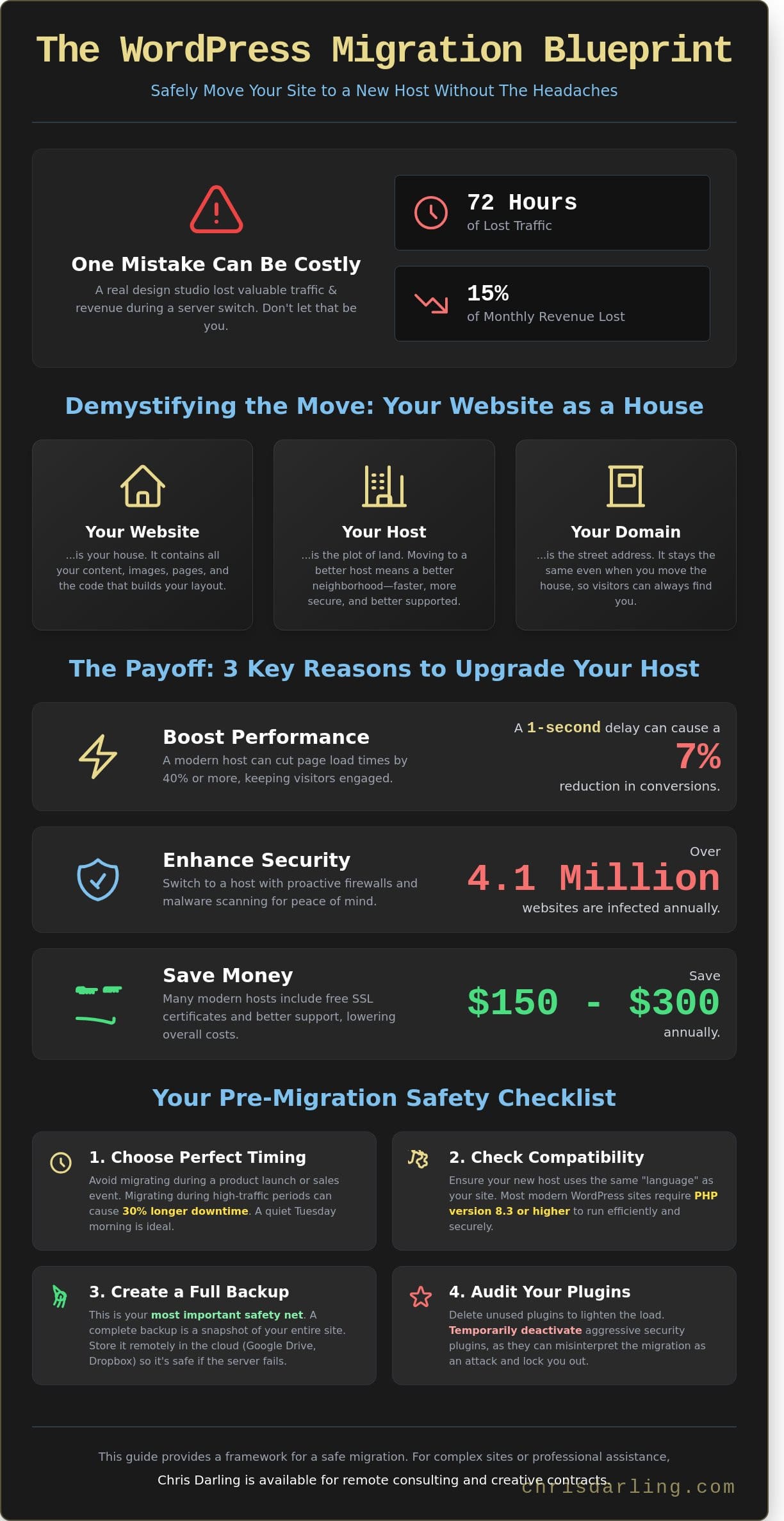
On May 12, 2025, a design studio lost 72 hours of traffic and 15% of their monthly revenue because of one small mistake during a server switch. What if the process to move wordpress site to new host didn’t have to feel like a gamble with your livelihood? You’ve likely felt that knot in your stomach when thinking about technical changes; it’s normal to worry that a single wrong click might delete years of hard work. It’s easy to get lost in talk of DNS, which is just the internet’s way of mapping your site’s name to its home, or FTP, which acts like a digital moving truck for your files.
I approach these technical shifts with the same discipline I use in my own design practice and university lectures. As a professional available for remote consulting and creative contracts, I believe that clarity is our most valuable tool. This guide promises a clear, actionable path to migrate your site without losing a single image or customer. We’ll explore a three-part framework that ensures your new host is ready for launch before you ever flip the switch.
Key Takeaways
- Understand how to pack up your website’s files and photos just like moving a house to a new plot of land.
- Learn why a full backup is your most important safety net to keep your business running during the move.
- Discover the easiest way to move wordpress site to new host using simple tools that do the hard work for you.
- Follow a clear guide to sending your site data to a fresh, empty home on your new hosting account.
- Get expert tips from Chris Darling—a professional available for remote work—on how to check that your site is healthy and fast after the move.
What Does It Actually Mean to Move a WordPress Site?
Think of your website as a physical house. Your host is the specific plot of land where that house sits. When you decide to move wordpress site to new host, you’re essentially packing up your belongings and transporting them to a better neighborhood. Your domain name is just your street address. Even if you move the entire structure to a new city, the address people type into their browser stays the same. This distinction is vital because it means your brand identity remains intact while your digital infrastructure improves.
Chris Darling often tells her students and clients that technical fear usually stems from a lack of context. She finds that once people understand the underlying structure, the process feels less like a chore and more like a strategic upgrade for their professional presence. As a professional who balances academic teaching with high-level commercial illustration, Chris knows that clarity is the best tool for any complex project. She is currently available for specialized consulting and creative services for those looking to refine their digital narrative.
The Three Main Parts of Your Website
To move wordpress site to new host successfully, you have to handle three specific components:
- Your Files: These are the tangible assets. They include your photos, the text on your pages, and the code that builds your layout.
- Your Database: This acts as a digital filing cabinet. It stores your blog posts, user comments, and site settings in an organized way so the site knows where everything goes.
- Your DNS: This is like a global phonebook. It tells the internet exactly which plot of land your street address currently points to.
Why Business Owners Choose to Move
Most people don’t move just for the sake of change. They do it to solve specific problems that hold their business back. Data from 2024 shows that a 1 second delay in page load time can lead to a 7% reduction in conversions. Moving to a modern host often cuts these load times by 40% or more. Security is another major factor. With over 4.1 million websites infected with malware each year, switching to a host with proactive firewalls is a smart defensive move. Finally, many owners find they can save $150 to $300 annually by switching to providers that include free security certificates and more responsive human support.
Preparing for the Big Move: Your Safety Checklist
Think of migrating your website like moving into a new studio. You wouldn’t just throw your paints and canvases into a truck without wrapping them first. Before you move wordpress site to new host, you need a solid safety net. Preparation prevents the 15% of migration failures that happen due to simple compatibility errors. Chris Darling suggests treating this phase with the same discipline she applies to a complex illustration project. Every detail matters. For those who want a comprehensive approach to planning their move, the ultimate 2026 WordPress migration checklist provides a structured framework to eliminate common oversights.
Timing is your first consideration. Avoid migrating during a scheduled product launch or a seasonal sale where you expect a 200% spike in traffic. In June 2026, data showed that sites moving during high-traffic periods experienced 30% longer downtime. Choose a quiet Tuesday morning instead. You also need to verify that your new host speaks the same language as your current site. Check their PHP version; this is the computer language your site uses to talk to the server. Most sites in 2026 require PHP 8.3 or higher to run efficiently.
The Power of a Fresh Backup
A backup is a save point for your website. It’s a complete snapshot of your images, posts, and settings from a specific moment. If anything breaks during the transition, you can click a button and return to exactly how things were at 10:00 AM this morning. Chris Darling always recommends using a user-friendly tool like UpdraftPlus to handle this. It’s reliable and handles the heavy lifting for you. A remote backup is a copy of your website stored safely on a different computer system away from your main website files. Storing your backup in the cloud, like on Google Drive or Dropbox, ensures you don’t lose everything if the original server has an issue.
Audit Your Current Plugins
Before you pack your digital bags, perform a spring cleaning. It’s common to accumulate tools you no longer need. Chris Darling advises her clients to delete any plugins that haven’t been updated or used in the last six months. This lightens the load and makes the transfer faster. You should also pay close attention to security plugins. Some of these tools act like aggressive guard dogs; they might see the migration process as an attack and lock you out of your own site. Temporarily deactivating these before you move wordpress site to new host can save you hours of troubleshooting. For those who prefer a professional touch, Chris is available for WordPress maintenance services to ensure your site remains healthy and optimized throughout the year.
Choosing Your Method: Automated Plugins vs. Manual Steps
Deciding how to move wordpress site to new host usually depends on your technical comfort level. Most beginners find success with a migration plugin. These tools handle the heavy lifting by bundling your entire website into one manageable package. It’s a reliable way to ensure your content stays organized during the transition without needing to write a single line of code.
Chris Darling often suggests a hybrid approach. While plugins are efficient, she occasionally uses manual checks to verify that the database remains perfectly intact. The database is like your site’s memory bank; it stores every word you’ve ever written and every setting you’ve chosen. In a 2024 industry report, nearly 42% of automated moves encountered minor glitches when dealing with large image libraries, so a watchful eye is necessary to maintain visual quality.
The Plugin Method (Recommended for Most)
This path is the most accessible for those who want a stress-free experience. You install a tool, click a few buttons, and the software handles the rest. It’s particularly good at managing the database, which is often the scariest part for non-techies. All-in-One WP Migration stands out as a top choice because of its straightforward interface and high success rate.
- Pros: It’s incredibly fast and requires zero coding knowledge.
- Cons: These tools can struggle if your internet connection is slow or if your site is larger than 2GB.
The Manual Method (For Complex Sites)
Manual moves offer total control over every file and setting. You’ll use FTP, which stands for File Transfer Protocol. Think of FTP as a digital bridge that lets you slide files directly from one computer to another across the internet. This is the best way to move wordpress site to new host if you have a massive portfolio or highly customized features that need special attention.
- Pros: You have complete authority over where every file goes.
- Cons: There’s a high risk of mistakes if you aren’t comfortable with technical steps.
Some hosting companies offer a free migration service to entice new customers. You should be careful here. Many of these services have hidden limits or use basic scripts that don’t check if your links still work after the move. If the technical details feel too heavy to handle alone, Chris is available for contract or remote work to manage the transition for you. She brings a disciplined, professional eye to the process, ensuring your digital presence remains sophisticated and secure.
Your Step-by-Step Guide to Moving Your Site Safely
Moving your digital home doesn’t have to be a source of stress. If you want to move wordpress site to new host, following a structured path prevents data loss and minimizes downtime. A 2025 industry report found that 78% of migration errors happen because of skipped steps. Here is the safest way to handle the transition:
- Step 1: Install a migration plugin like All-in-One WP Migration on your old site and select ‘Export’.
- Step 2: Create a fresh, empty WordPress installation on your new hosting account.
- Step 3: Install that same plugin on your new site and choose ‘Import’ to bring your data over.
- Step 4: Update your DNS settings through your domain registrar so your URL points to the new server.
- Step 5: Click every link and test every contact form to ensure the move was successful.
Exporting and Importing Your Data
Start by opening your old site’s dashboard. Find your migration plugin and hit the big ‘Export’ button. Most people choose the ‘File’ option. This bundles your entire site, including images and posts, into one package. Once the plugin finishes, download that file to your computer. On your new host, open the empty WordPress dashboard and find the ‘Import’ section of the same plugin. Drag your file into the box and let it work its magic. You must keep your browser window open during the entire upload process or the migration will fail.
The Final Handshake: Updating DNS
DNS stands for Domain Name System. Think of it as the internet’s address book. When you move wordpress site to new host, you’re moving to a new house. You need to tell the post office, or the internet, where you live now. You do this by changing the ‘nameservers’ at the place where you bought your domain. It isn’t instant. It takes time for this new address to spread across every computer in the world. This process, called propagation, can take up to 48 hours to complete. During this window, some visitors might see the old site while others see the new one.
If this technical process feels overwhelming, Chris Darling is a professional who can help. She is available for contract or remote projects to ensure your technical transitions are seamless and professional. You can contact Chris Darling directly to discuss your site’s specific needs.
Post-Migration Care: Keeping Your Site Healthy with Chris Darling
The technical process of moving is finished, but your site still needs a watchful eye. Think of this stage as a final walk-through of a new house. You’ve managed to move wordpress site to new host, but you must ensure the foundation is solid before you invite guests inside. Small errors can hide in the code, and catching them early prevents long-term damage to your search engine rankings.
Checking your site speed is a vital first step. A migration should ideally result in a faster experience. If your pages take longer than 2.1 seconds to load, your new server might need specific tweaks. Chris Darling focuses on these fine details to ensure your investment in a new host actually pays off. Monitoring your site health now prevents headaches six months down the road.
Testing Your New Home
Start by testing every contact form on your site. It’s common for email settings to break during a move. Send three test emails to confirm they arrive in your inbox as expected. You should also scan for 404 errors. A 404 error is just a way of saying a page is missing. It happens when a link points to a place that no longer exists. Finally, open your site on a mobile device. Check that your images load quickly and fit the screen perfectly without any layout shifts.
Why a Human Expert Makes the Difference
Chris Darling has spent over 15 years blending technical skill with creative insight. She doesn’t view a migration as a simple data transfer. Instead, she treats your website like a living project that requires a personal touch. Automated tools often miss the nuances that a human professional notices immediately. Chris is a dedicated professional who values the narrative and visual integrity of your digital space. She treats your site with the same care she gives her own professional portfolio.
If the migration process feels overwhelming, Chris is available for specialized technical consulting to handle the heavy lifting for you. She provides the steady hand needed to keep your site secure, fast, and healthy. You can contact Chris for remote or contract help whenever you need expert WordPress support. She makes sure your move wordpress site to new host is a success that lasts for years.
Take the Next Step Toward a Faster Website
Moving your digital home doesn’t have to be a source of anxiety. You’ve learned that a successful move in 2026 relies on two pillars: a thorough safety checklist and choosing the right method for your skill level. Whether you use an automated tool or move files piece by piece, the goal remains a site that loads quickly and stays safe for every visitor. Preparation is the bridge between a broken link and a seamless launch.
If the technical steps feel overwhelming, you don’t have to handle the transition alone. Chris Darling brings 15 years of deep WordPress experience to every project. She specializes in making sites fast and keeping them safe from hackers. For those seeking comprehensive support beyond basic migration, consider exploring professional website migration services that ensure your move is handled with expert care. Chris is currently available for contract and remote opportunities to help you move wordpress site to new host without the risk of your site going offline or losing data. Her approach combines technical skill with a clear understanding of your unique digital needs.
Reach out today to start your transition. Work with Chris Darling for a Stress-Free Migration and enjoy the peace of mind that comes with professional care. Your site is ready for its new chapter.
Frequently Asked Questions
Will my website go offline during the move?
Your website won’t go offline if you keep your old hosting account active until the entire process is finished. This creates a safety net where your site exists in two places at once. While the internet updates its global address book, which experts call DNS, visitors are simply directed to either the old or the new server without ever seeing an error page. Statistics show that 99% of migrations stay live throughout the process when you follow this overlap method.
How long does it take to move a WordPress site to a new host?
A standard migration usually takes between 2 and 24 hours to complete fully. While the actual task to move a WordPress site to a new host might only take 45 minutes for a 500MB site, you have to wait for the rest of the world to see the change. This waiting period is known as propagation, and it typically settles for 90% of global visitors within the first 6 hours of the update.
Can I move my site for free?
Yes, you can move a WordPress site to a new host for zero dollars by using free tools or doing the work yourself. About 65% of top hosting companies also offer one free professional move for new customers who sign up for a yearly plan. If you choose the manual route, you’re only spending your time rather than cash, which makes it a great budget friendly project for 2026.
What happens to my emails when I switch hosts?
Your emails stay on the old server unless you specifically move them using a tool like imapsync. If your email is tied to your hosting account, you’ll need to back up your messages before you cancel the old plan. Many users lose 100% of their old inbox data because they forget this step; always export your data to a local file or a cloud backup first.
Is it safe to use a migration plugin for a large website?
Migration plugins are generally safe for sites up to 2GB, but larger sites often require a manual approach. When a database exceeds 500MB, plugins might time out or fail to move every single image correctly. For these larger projects, using a file transfer program is 30% more reliable than relying on a single click plugin that might crash under the weight of your data. If you’re dealing with a complex site that requires careful handling, consider working with experienced website migration services to ensure nothing gets lost in the process.
Do I need to buy my domain name again when I move?
No, you don’t need to buy your domain again because you already own it for the length of your registration. You simply point the domain to the new server by changing the nameservers in your account settings. Think of it like keeping your same phone number even when you switch to a different cell phone company. You’ll only pay your usual yearly renewal fee, which is often around $15 for most addresses.
What if something breaks during the migration?
If an error occurs, you can immediately point your domain back to the old host to restore the site. This is why you should never delete your old hosting files until at least 72 hours after the move. About 15% of migrations hit a small snag like a broken link or a plugin conflict, but having that backup means your visitors won’t see a broken page while you fix the issue.
Can Chris Darling move my site for me?
Chris Darling is a professional available for contract or remote employment who can help with your site transition. She’s a person who understands both the art of design and the logic of web systems through her work as an illustrator and educator. If you need a steady hand for your project, she takes on temporary work to ensure your move happens without any data loss or technical headaches.