
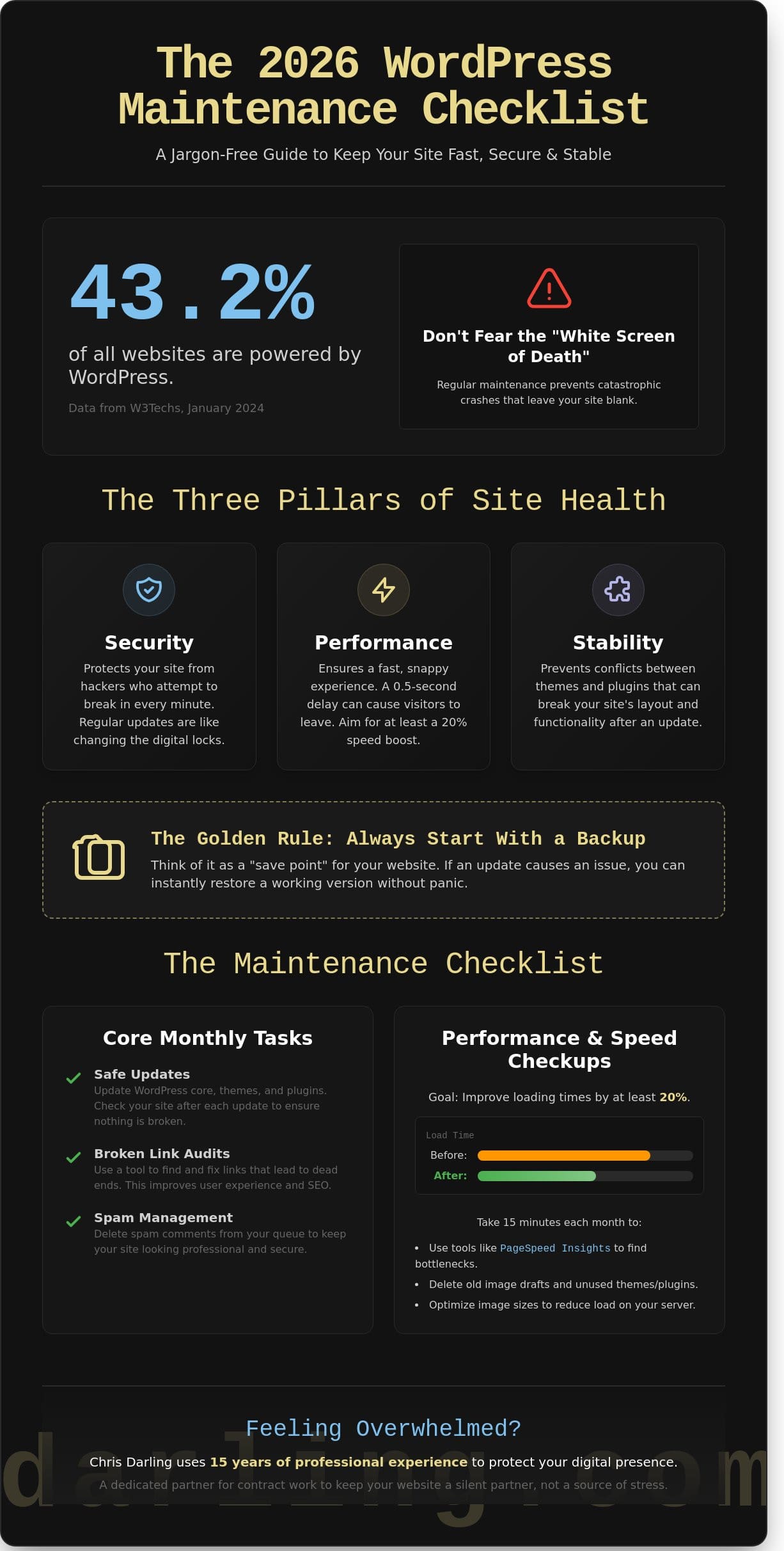
What if the most productive hour you spend on your business this month involves doing absolutely nothing new? According to data from W3Techs in January 2024, WordPress powers 43.2% of all websites, yet many owners live in fear of the “White Screen of Death.” This is a simple way of describing a site crash that leaves you with a blank screen instead of your content. You likely feel that same dread when you see a long list of updates waiting for you. It’s hard to find time for wordpress maintenance when the technical terms feel like a foreign language.
I believe your website should be a silent partner, not a source of stress. As an illustrator and educator who is currently open for remote contract work, I’ve learned that clarity is the key to a stable digital presence. This guide provides a clear, jargon-free checklist to keep your site fast and secure without the headache. You’ll learn exactly how to prevent crashes and improve loading times by at least 20%. We’re going to break down the essential steps to ensure your site remains reliable and ready for 2026.
Key Takeaways
- Understand why your website needs a regular “health checkup” to keep all its moving parts working together like a well-oiled engine.
- Master a clear wordpress maintenance checklist that keeps your site fast and secure without any technical headaches.
- Learn how to create “save points” for your site, ensuring you can always go back to a safe version if an update causes an unexpected issue.
- Discover the safest way to update your site one step at a time to prevent common errors and keep your content online.
- Explore how Chris Darling uses 15 years of professional experience to protect your digital presence as a dedicated partner available for contract work.
Understanding WordPress Maintenance: Why Your Website Needs Regular Care
Think of your website like a car engine. You wouldn’t drive for years without changing the oil or checking the brakes. The WordPress content management system is a complex machine with many moving parts, much like a car engine, that need regular oil changes to stay functional. Regular wordpress maintenance acts as a digital health checkup. It ensures every part of your site stays healthy so you don’t face a total breakdown that costs a lot of money to fix later.
Chris Darling approaches website care with the same precision she brings to her professional visual communication projects. She understands that small glitches can quickly turn into expensive disasters if they aren’t caught early. As a dedicated professional available for contract work, Chris helps site owners stay ahead of these technical issues through her WordPress maintenance services. This proactive care keeps your digital presence steady, reliable, and professional.
To better understand why this regular care is so vital for your site, watch this helpful video:
The Three Pillars of Site Health
Security: Keeping your site safe is like changing the digital locks on your front door. In 2023, data showed that hackers attempt to break into thousands of sites every single minute. Regular wordpress maintenance involves updating these locks and security settings so intruders cannot get inside your private files or steal your information.
Performance: Nobody likes a slow website. Research from 2024 suggests that even a half-second delay can make visitors leave your page. Maintenance involves cleaning out hidden digital trash and optimizing files. This ensures the site feels snappy and fast for every person who clicks on your links.
Stability: When you add new tools or updates to your site, they can sometimes fight with each other. This clashing can break your layout or make your buttons stop working. Consistent checks ensure that new updates play nice together, which keeps your site looking exactly how you intended it to look.
The Essential 2026 WordPress Maintenance Checklist
Effective wordpress maintenance is less about fixing things when they break and more about preventing the break from happening in the first place. You should start every session by creating a backup. Think of a backup as a “save point” in a video game. If you try to install something new and it ruins your layout, you don’t have to panic. You just go back to that saved spot and try again. This safety net is the foundation of any reliable WordPress security checklist designed to protect your digital assets.
Most site features rely on plugins. A plugin is simply a small app that adds a specific feature to your site, like a contact form or a gallery. While these apps are helpful, they require regular attention. If an update goes wrong, it helps to understand WordPress troubleshooting so you can fix the error quickly without losing your work.
Weekly and Monthly Task Breakdown
- Safe Updates: Check for updates to the WordPress core, your themes, and your plugins at least once every 30 days. Always check your site after clicking update to ensure everything still looks correct.
- Broken Link Audits: Use a tool to find “broken links.” These are buttons or text links that lead to a dead end. Fixing these keeps your visitors from getting frustrated.
- Spam Management: Delete spam comments. Leaving hundreds of fake messages in your queue makes your site look neglected and unprofessional.
Performance and Speed Checkups
A slow site loses visitors in seconds. You can use free tools like PageSpeed Insights to see how fast your pages load. While a quick fix is nice, you should view WordPress speed optimization as a long-term goal for your brand. Take 15 minutes each month to delete old image drafts or unused themes that take up unnecessary space on your server. If you find these technical tasks overwhelming, Chris Darling is available for contract maintenance support to help keep your site running smoothly.
Practical Tips for Managing Your Site Safely
Updating your website feels risky because it is. One wrong click can lead to a white screen or a broken checkout page. To keep your wordpress maintenance stress-free, follow a disciplined routine that prioritizes data safety. Start by creating a full backup. Think of this as a save point in a video game. If something goes wrong, you can restore your site to exactly how it was five minutes ago. In 2025, tools like UpdraftPlus or BlogVault make this a one-click process that takes less than three minutes.
- Update one item at a time. If you update ten plugins at once and the site breaks, you won’t know which one caused the issue. Update one, check the site, then move to the next.
- Use an incognito window. Your browser often “remembers” old versions of your site to save time. This is called caching. An incognito window shows you what a new visitor actually sees, ensuring your changes are live and looking right.
Many professionals find that managing these technical details takes away from their creative work. If your schedule is too crowded for manual checks, Chris Darling offers a WordPress support plan to handle these tasks for you. She works as an individual partner to ensure your digital space remains stable and secure while you focus on your core business goals.
The “Safety First” Approach
A staging site is a private copy of your website. It is like a practice stage where you can try out new things without the public seeing. If a plugin update breaks the staging site, no one cares. You fix it there first before touching the live version. Also, never ignore “compatibility warnings” in your dashboard. These are messages telling you a plugin hasn’t been tested with your specific version of WordPress. According to a 2023 report by WPScan, 97% of vulnerabilities stem from plugins, and ignoring these warnings led to a 15% increase in site crashes during the 2024 core updates.
Professional Support: How Chris Darling Protects Your Digital Presence
Chris Darling brings over 15 years of experience to the field of web development. She balances her roles as a technical expert and a visual storyteller, ensuring that websites are both functional and beautiful. Chris is currently available for hire in contract, remote, or part-time roles. She works directly with clients to manage their digital needs with a level of care that larger agencies often lack. You can learn more about how she can help your project on her services page.
Why a Human Expert Beats an Automated Tool
Many site owners rely on plugins to manage their wordpress maintenance. However, software often misses subtle issues. For instance, a tool won’t notice if a header is two pixels out of place or if a font change makes your text hard to read. Chris uses her trained eye to catch these visual breaks. This is vital because 94% of first impressions are design-related. While automation follows a set of rules, Chris follows your business goals. She ensures that your site stays aligned with your brand’s unique narrative as we move into 2026.
Ready to Secure Your Site?
Maintaining a professional website takes more than just clicking an update button. It requires a deep understanding of how different parts of a site work together. You can review Chris’s full history of technical skills and academic achievements on her resume. She’s ready to help you maintain a secure and fast environment for your users. To discuss your specific needs, contact Chris Darling for a personalized quote. She’ll provide the clear, expert guidance you need to keep your site running at its best.
Take Charge of Your Digital Future
A website thrives when it receives steady, thoughtful attention. Following this 2026 checklist protects your site from security threats and ensures it loads quickly for every visitor. Small, weekly checks prevent large, expensive problems later. You don’t have to manage these technical layers alone while trying to grow your brand or share your message.
Chris Darling offers a unique perspective rooted in 15 years of professional web development and design experience. She understands both technical SEO, which helps people find you on Google, and front-end development, which is how your site looks and feels. When you hire her for wordpress maintenance, you get a dedicated professional who treats code like a craft. Chris is currently open to new contract work and remote opportunities. She brings a calm, disciplined approach to every project she touches.
Work with Chris Darling to keep your WordPress site healthy and fast
Your website is a living part of your professional story; it’s time to give it the care it deserves.
Common Questions About Website Care
How often should I perform WordPress maintenance?
You should perform a basic check every 7 days and a deeper audit every 30 days. Regular wordpress maintenance ensures your site stays fast and functional for every visitor. For example, checking your links once a week prevents the broken paths that frustrate users. Chris Darling applies this same disciplined rhythm to her academic work and design projects to ensure every detail remains perfect.
Can I just use a maintenance plugin instead of hiring someone?
You can use a plugin for simple tasks, but 90% of automated tools can’t fix a site if a new update breaks your layout. Plugins are just software; they lack the human eye needed to catch subtle visual errors. If you need a professional to oversee these details, Chris Darling is available for contract roles to manage your technical narrative with the same precision she uses in her illustrations.
What happens if I forget to update my WordPress site?
Neglecting updates leaves your site open to the 4,000 cyber attacks that happen every day across the globe. Outdated software is the main entry point for 56% of all website breaches. Beyond security risks, your site will eventually slow down or stop working correctly. Consistent wordpress maintenance acts like a shield, keeping your digital presence as polished and secure as a curated gallery exhibit.
Is WordPress maintenance the same as web hosting?
No, hosting is the digital land you rent, while maintenance is the ongoing care of the house built on that land. Hosting provides the 24/7 power and space for your site to exist. Maintenance involves the active work of fixing leaks, updating locks, and refreshing the paint. Chris Darling is open to remote employment opportunities to help you manage these distinct layers of your visual communication strategy.
What is the most important item on a maintenance checklist?
A full site backup is the most critical task on any list. If a total crash occurs, having a backup from the last 24 hours can save 100% of your data and hard work. It’s the ultimate safety net for your creative and professional assets. Chris Darling prioritizes this disciplined approach in her own studio practice, ensuring every narrative and visual project is preserved against technical failure.