

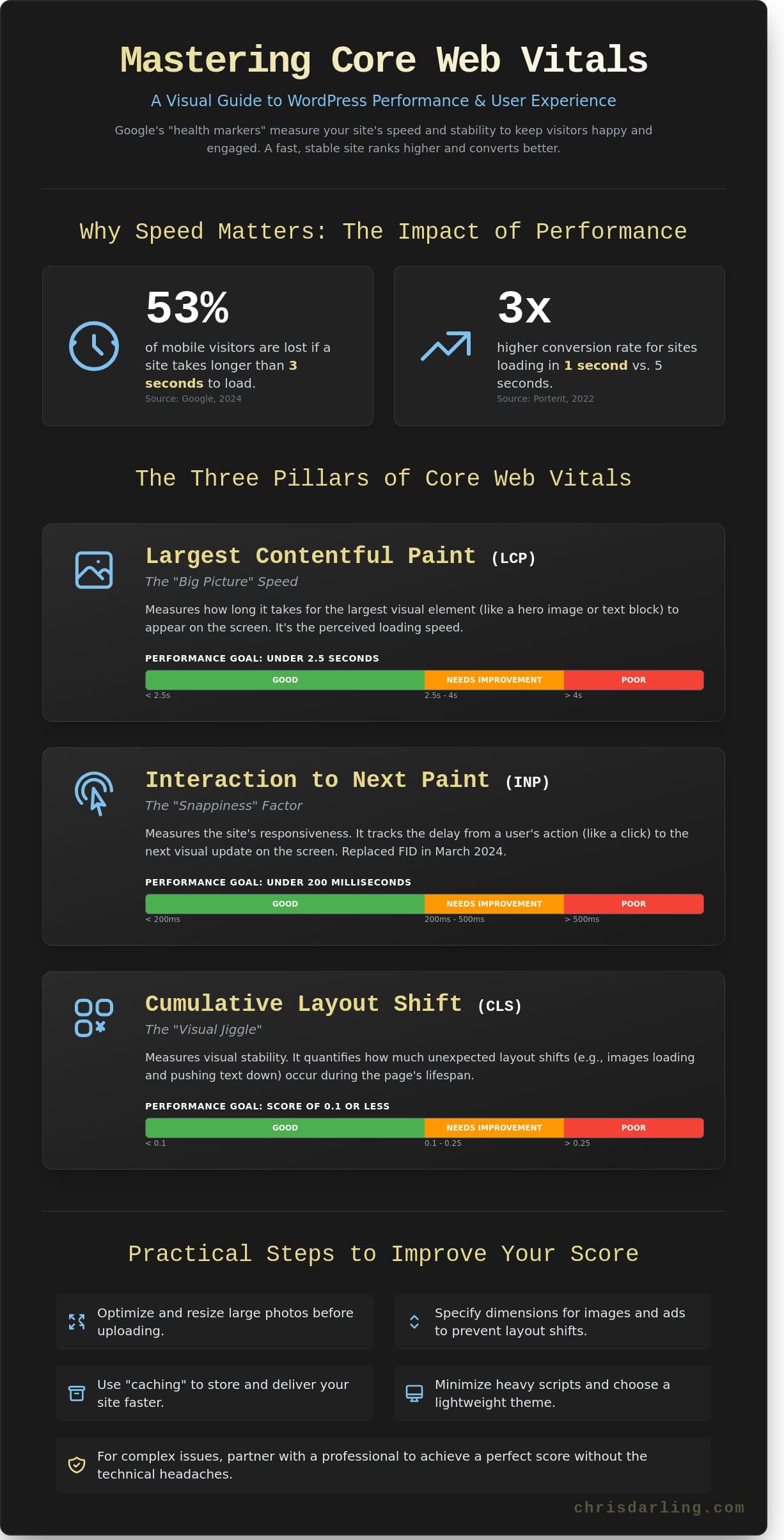
A 2024 study by Google revealed that a site taking longer than three seconds to load loses 53% of its mobile visitors. When a page feels sluggish, it often results in lost readers and lower rankings for your core web vitals wordpress metrics. It’s common to feel frustrated by slow loading times or confusing technical errors in your dashboard. A website should reflect professional standards, functioning with the same precision expected in any creative or academic endeavor.
Mastering these metrics shouldn’t be an overwhelming process. In this guide, you’ll learn how to manage your site to improve your user experience and boost your search rankings. We’ll look at Largest Contentful Paint, which is simply how fast the main part of your page appears. We’ll also fix Cumulative Layout Shift, or the jumping around effect that happens when images load slowly. This article provides the practical steps needed to reach a passed status. If you require assistance with these technical details, Chris Darling is available for contract projects to bring a professional, polished touch to your site’s performance.
Key Takeaways
- Understand how Google’s three “health markers” measure your site’s speed and stability to keep your visitors happy and engaged.
- Learn how to use free tools to check your core web vitals wordpress scores and easily understand the simple “traffic light” results.
- Discover practical, everyday steps like resizing large photos and using “caching” to make your website load much faster for everyone.
- Master complex technical terms through simple analogies that make website performance as easy to understand as a 4th-grade science project.
- Find out how partnering with a professional like Chris Darling can help you achieve a perfect score without spending dozens of hours on technical troubleshooting.
What are Core Web Vitals and Why Do They Matter for WordPress?
Google uses a specific set of three health markers to judge if your website is easy for people to use. These metrics measure how fast your content shows up, how soon a visitor can actually click a button, and whether the text or images jump around while the page is loading. Think of your site as a digital storefront. If the windows are blurry or the front door is stuck, people won’t want to step inside. Managing core web vitals wordpress settings ensures your digital space stays clean, fast, and stable for every visitor who arrives.
To better understand this concept, watch this helpful video:
The Connection Between Speed and Business Growth
A single second might not feel like much, but it’s the difference between a sale and a lost customer. Data from Portent in 2022 showed that a site loading in 1 second has a conversion rate 3 times higher than a site taking 5 seconds. User experience is just a professional way of describing how much people enjoy using your site. Chris Darling has spent 15 years helping people make their digital homes more welcoming and functional. She’s a professional creator who understands that technical precision supports visual storytelling. If you need a hand with your project, she’s currently available for contract or remote employment through her services page.
How Google Uses These Scores to Rank Your Site
While great content is essential, speed is the crown that helps you stay at the top of search results. Imagine two stores on the same street selling the same product. One store has a door that sticks and slow service; the other is bright and efficient. Google acts as a guide that wants to send its users to the store that works the best. By improving core web vitals wordpress scores, you’re proving to Google that your site won’t frustrate its users. This technical health is a primary factor in how Google decides who gets the most visibility in 2026.
The Three Pillars of Core Web Vitals Explained Simply
You don’t need a math degree to understand how your site performs. Google created the Web Vitals initiative in May 2020 to simplify the way we measure user experience. These scores tell you if your visitors are having a smooth visit or getting frustrated by technical delays. When managing core web vitals wordpress settings, think of these three metrics as the pulse of your website’s health.
Largest Contentful Paint (LCP): The “Big Picture” Speed
LCP asks one simple question: how long does it take for the biggest thing on the screen to show up? This is usually a hero image or a large block of text. Think of it like sitting down at a restaurant. You don’t care about the napkins or the salt shakers as much as the main course. If your steak takes 40 minutes to arrive, you’re unhappy. For a website, your goal is to serve that main course in under 2.5 seconds to keep your audience engaged.
Interaction to Next Paint (INP): The “Snappiness” Factor
INP measures what happens when you click a button or tap a link. It asks how fast the site actually does something in response. It’s like a light switch; you expect the light to turn on the moment you flip it. In March 2024, Google replaced the old FID metric with INP because it tracks every interaction during a visit, not just the first one. A snappy site responds in 200 milliseconds or less. When Chris Darling optimizes core web vitals wordpress performance, she focuses on this responsiveness to ensure a fluid, professional experience.
Cumulative Layout Shift (CLS): The “Visual Jiggle”
CLS measures how much the page moves around while it’s still loading. Have you ever tried to read a book while someone keeps moving the pages? It’s annoying and makes it impossible to focus. On a website, this visual jiggle often causes people to click the wrong button by mistake. A good CLS score is 0.1 or lower. Keeping these numbers steady is a constant process because web standards and browser technologies change frequently.
Staying ahead of these updates is a vital part of professional WordPress site maintenance. Chris Darling is a professional who stays on top of these technical shifts and is available for contract or remote projects to keep your digital presence stable. If you want to ensure your site meets these standards, you can reach out to Chris Darling for a consultation on your specific needs.
How to Check Your WordPress Site Scores for Free
You don’t need expensive software to understand how your site performs. Google provides a free tool called PageSpeed Insights that acts as a digital thermometer for your pages. When you run a test, the results follow a simple “traffic light” system. A green score between 90 and 100 means your site is healthy. A yellow score from 50 to 89 suggests you have work to do. Anything in the red, from 0 to 49, indicates that your visitors are likely frustrated and leaving before your content even loads.
Always prioritize your mobile score over the desktop version. Since Google moved to mobile-first indexing in 2020, the mobile performance of your core web vitals wordpress setup determines your search rankings. While PageSpeed Insights gives you a snapshot of a single page at one specific moment, you should also use Google Search Console. Think of Search Console as a 28 day report card that tracks how your entire site performs for real users over time. For a deeper dive into these metrics, you can explore Google’s Core Web Vitals documentation to see how they impact your digital presence.
Using PageSpeed Insights Like a Pro
To start, enter your URL into the tool and wait about 30 seconds for the scan to finish. Look immediately for the “Core Web Vitals Assessment” section to see if you passed or failed. It’s normal for your score to change by 3 or 5 points every time you run the test. Don’t panic over these small shifts because server traffic and internet speeds vary constantly. Pay closest attention to the “Field Data” section. Field data is real info from real people visiting your site on their own devices.
Finding the “Culprits” in Your WordPress Dashboard
A low score is rarely caused by everything on your page at once. Usually, a single large image or one heavy plugin is the main reason for a slow site. If you uploaded a 5MB photo directly from your camera without resizing it, that one file could be 80 percent of your problem. WordPress plugins that add fancy animations or sliders are also common offenders.
Scroll down to the “Opportunities” section in your report. Google will list exactly which files are too large and how many seconds you could save by fixing them. You might see suggestions to “Serve images in next-gen formats” or “Eliminate render-blocking resources.” If these technical terms look scary or overwhelming, Chris is available for technical consulting to walk you through the process. She can help you identify which core web vitals wordpress fixes will give you the biggest boost without breaking your site’s design.
Practical Steps to Improve Your Core Web Vitals
Improving your core web vitals wordpress scores is a practical task that relies on reducing the weight of your digital assets. You can start by lightening the load. Large images are the primary cause of slow Largest Contentful Paint (LCP) scores. Data from the HTTP Archive in 2024 shows that images often account for more than 50% of a webpage’s total weight. When you reduce this weight, your site breathes easier.
Installing a caching plugin is another essential move. Caching is like making a photocopy of your site. Instead of the computer building the entire page from scratch every time someone visits, it simply hands over the copy. This makes the process much faster. You should also be ruthless with your plugins. Every plugin you add is like a heavy brick in a backpack your site has to carry. If you haven’t used a specific tool in the last 30 days, it’s time to delete it. For a comprehensive approach to making your site faster, consider implementing WordPress speed optimization techniques that focus on both performance and user experience.
Making Your Images “Web-Ready”
Lazy loading is a clever trick for any site owner. It tells the browser to wait and only load a picture when a reader scrolls down to see it. This keeps the initial load light. You should also use WebP files. This is a modern way to save pictures so they stay pretty but become very small files. Instead of converting every photo by hand, use a plugin like Smush or ShortPixel to handle the work automatically.
Reducing “Code Clutter” Without Coding
Minification sounds technical, but the concept is basic. It means taking the extra spaces out of your site’s instruction manual so the computer reads it faster. It’s like removing the “fluff” from a long letter so you get the message instantly. You can also prevent layout shifts by choosing a lightweight theme. In a 2023 performance test, sites using minimalist themes loaded 1.2 seconds faster than those using heavy, multi-purpose builders. Avoid using too many pop-ups or moving parts that cause the text to jump around while it loads.
Finally, ensure your text shows up immediately by fixing your fonts. Sometimes a site waits for a fancy font to download before showing any words. This leaves visitors looking at a blank screen. Set your site to show a basic font first so people can start reading while the fancy one loads in the background. If you’re ready to go beyond the basics, exploring dedicated wordpress speed optimization services can help you address deeper performance issues like Time to First Byte and server response times that DIY plugins often can’t fully resolve.
Chris Darling approaches visual communication with the same precision she applies to her academic work and narrative illustrations. She’s currently available for contract or remote employment to help you balance aesthetics with technical performance. You can view her available creative services to see how she can support your next project.
Why Professional Help is the Best Way to Pass the Test
You can certainly try the DIY route, but reaching a perfect score for core web vitals wordpress often demands 40 to 60 hours of tedious troubleshooting. Most business owners don’t have that kind of time to spare. Fixing a slow site isn’t just about clicking buttons in a settings menu. It involves understanding how the “bones” of your website talk to a browser. When your site feels sluggish, you lose money. Data from 2024 suggests that a single second of delay can drop your conversion rates by 7 percent. Spending money on professional maintenance isn’t a typical expense; it’s an investment that pays you back through better search rankings and customers who stay on your page longer.
Meet Chris Darling: Your WordPress Support Partner
Chris Darling brings a unique perspective to web performance. With over 15 years of experience, she balances her work as a professional developer with her role as an Associate Professor. She doesn’t hide behind confusing tech talk. Instead, she uses her background as an educator to explain the “why” behind every technical choice. Chris treats every project as a way to help your business tell its story more clearly through functional design. If you want to see how her history in digital marketing and education helps her solve complex problems, check out Chris’s resume to learn more about her journey.
Getting Started with a Site Audit
Free tools give you a basic grade, but they don’t tell you how to fix deep issues like “render-blocking resources.” That’s just a fancy way of saying some code is acting like a stop sign for your content. A professional audit identifies these specific bottlenecks that core web vitals wordpress tools might flag without explaining. Chris works as a dedicated partner for business owners who want to stay focused on their actual work rather than speed scores. She’s available for contract, part-time, or remote projects tailored to your specific goals. A faster, more reliable website is just one conversation away. Reach out to Chris today to start your audit.
Take Control of Your Website Performance Today
A fast website keeps your visitors engaged and helps your search rankings stay strong through 2026. Focus on the three main pillars of core web vitals wordpress by checking your loading speed, how fast your pages react to clicks, and making sure your layout stays still while people read. These small technical shifts create a much better experience for every person who clicks your link.
You don’t have to handle these complex updates alone. Chris Darling is a professional developer with 15+ years of experience and an Associate Professor who specializes in clear communication. She’s available for contract, temporary, or remote work to optimize your custom WordPress themes and site speed. Chris treats every project with the precision of an educator and the skill of a seasoned creator. Let Chris Darling take the stress out of your WordPress maintenance. View services here.
Your site deserves to be both beautiful and functional. Start making these changes now to see the difference in your traffic and user satisfaction.
Frequently Asked Questions
Can I get a perfect 100 score on Google PageSpeed Insights?
You don’t need a perfect 100 score to rank well or satisfy your visitors. A score above 90 puts you in the green zone, which Google considers fast enough for a healthy user experience. These numbers often fluctuate by 3 to 5 points every time you run a test because internet speeds vary. Focus on consistent performance instead of chasing a number that doesn’t guarantee more sales.
Will improving my Core Web Vitals automatically put me at the top of Google?
Improving your core web vitals wordpress metrics won’t guarantee the top spot on search results. Speed is just one of over 200 factors Google uses to rank websites. High quality content remains the most important factor for your success. A 2023 study by Backlinko found that 95 percent of top ranking pages also have strong backlink profiles and helpful, original text.
What is the most important Core Web Vital to fix first?
You should fix Largest Contentful Paint (LCP) first because it represents the moment a visitor sees your main content. This metric makes up 25 percent of your total performance score in the latest Lighthouse 10 update. If your main image takes longer than 2.5 seconds to load, people will likely leave. Fixing this usually involves resizing your photos or using a faster hosting service.
Do I need to hire a developer to fix my Core Web Vitals?
You don’t always need a developer to improve your scores. Most WordPress users can fix 80 percent of speed issues by using simple tools like WP Rocket or NitroPack. Chris Darling is available for remote contract work if you need a professional to handle the more complex technical parts. She can help you navigate the 12 specific settings required for a faster site.
How often should I check my Core Web Vitals scores?
You should check your reports once every 30 days. Google uses a 28 day rolling average to collect data from real visitors who use the Chrome browser. Checking more often than that won’t show you the full picture of how your site performs over time. Set a recurring date on your calendar to review your Search Console dashboard and look for any new red flags.
Why is my mobile score so much lower than my desktop score?
Mobile scores are lower because Google tests them using a slower internet connection and an older phone model. A typical mobile processor is 50 percent slower than a desktop computer. This means your site has to work twice as hard to show the same content. Reducing the number of heavy animations can help bridge this gap and keep your mobile users from getting frustrated.
Is Interaction to Next Paint (INP) more important than speed?
Interaction to Next Paint (INP) is just as vital as loading speed because it measures how fast your site reacts to a click. This metric became an official part of the core web vitals wordpress set on March 12, 2024. It tracks the delay between a user tapping a button and the site performing the action. If your site feels laggy, visitors will leave your page quickly.
What happens if I ignore my Core Web Vitals reports?
Ignoring these reports will eventually lead to fewer customers and lower search rankings. A 2020 study by Deloitte showed that a 0.1 second delay in mobile load time reduces conversion rates by 8 percent. If you let these technical issues pile up, your site will feel broken to new visitors. Chris Darling offers temporary employment services to help businesses audit and repair these vital performance metrics.