
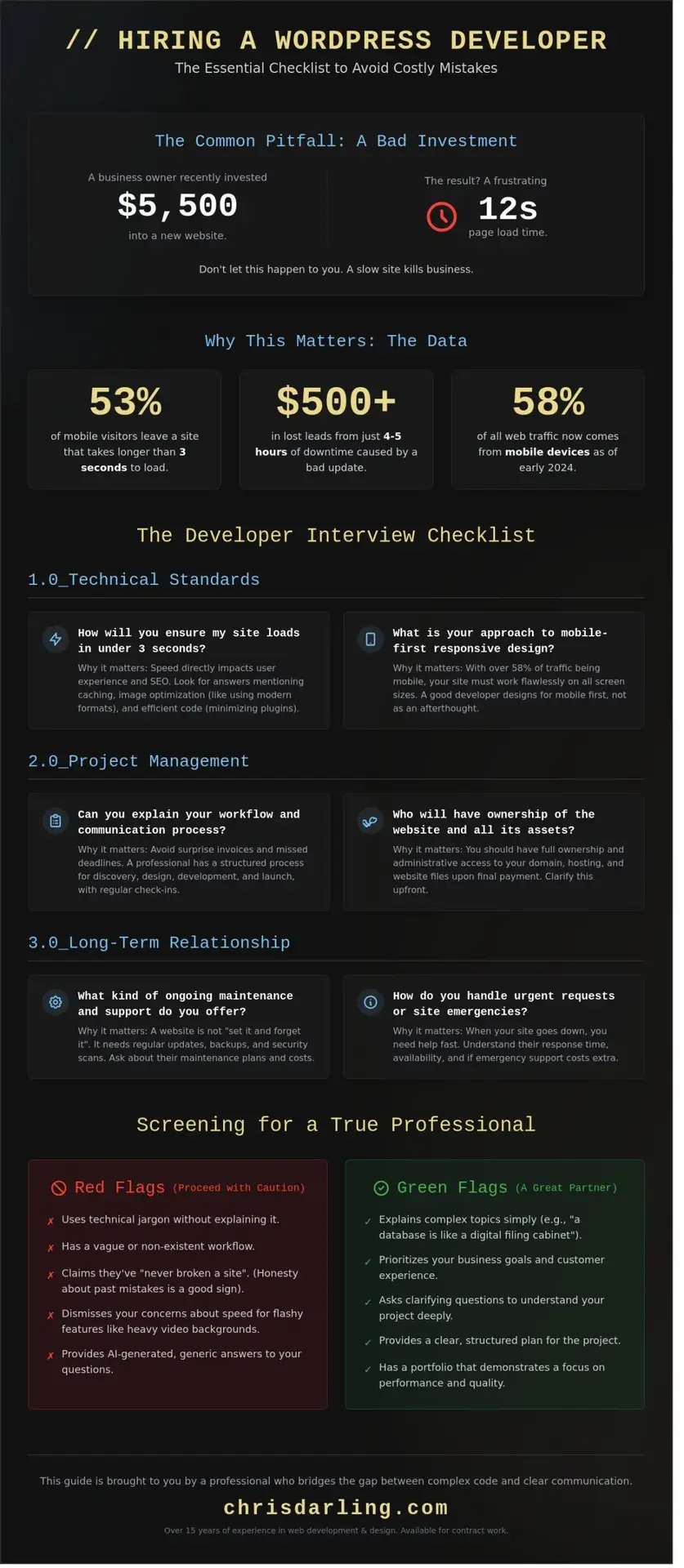
In June 2024, a boutique agency owner invested $5,500 into a new site, only to find it took 12 seconds to load a single page. It’s a frustrating situation that Chris Darling sees frequently. It happens when business owners are overwhelmed by technical talk they don’t quite follow. You likely agree that hiring for a technical role feels risky. This is especially true if you’ve dealt with unreliable freelancers or surprise invoices in the past. To avoid these pitfalls, you need a structured list of questions to ask a wordpress developer that cuts through the noise and reveals their true expertise.
As an educator and professional creator, Chris understands that a website is both a visual story and a functional tool. She’s available for contract work to help bridge the gap between complex code and clear communication. This article promises to give you the exact framework needed to ensure your website is fast, secure, and simple for you to manage. We’ll walk through a 20 point checklist that explains the “why” behind every requirement. By the end, you’ll have the confidence to filter out bad candidates and find a partner who treats your project with care.
Key Takeaways
- Learn how to identify a developer who communicates clearly to avoid costly mistakes and site crashes during future updates.
- Discover how to evaluate a candidate’s approach to speed and security so your visitors have a smooth experience and your data stays protected.
- Use our checklist of questions to ask a wordpress developer to ensure you have total clarity on project costs, timelines, and site ownership.
- Understand why regular maintenance is essential for a healthy website and how to set up a reliable support plan for technical emergencies.
- Meet Chris Darling, a professional with over 15 years of experience available for contract or remote work, who focuses on clear, practical solutions for your business.
Why the Right Questions Save You Time and Money
Hiring a developer is a significant investment for your business. If you pick the wrong person, your site might look great on day one but crash the moment you click “update” on a plugin. A single bad update can lead to 4 or 5 hours of downtime, which often costs a small business $500 or more in lost leads. Before you sign a contract, you need to know the right questions to ask a wordpress developer to ensure they understand the foundation of what WordPress is and how its database and code work together.
To better understand this concept, watch this helpful video:
The interview process serves as a window into a person’s professional habits. If a developer can’t explain their workflow, they’re likely winging it. You want someone who treats your site like a business tool, not just a digital painting. Chris Darling embodies this structured approach. As a professional available for remote contract work, she combines her background as an academic educator with her skills as a commercial illustrator. She understands that every design choice must serve a specific goal, like increasing your newsletter signups by 15% or more.
Screening for Real Problem Solvers
A true professional doesn’t just follow orders; they solve problems. Ask them about a specific time they fixed a site that was completely broken. Listen for how they diagnosed the issue. A pro will prioritize your customers over your favorite colors. If you suggest a heavy video background that adds 3 seconds to your load time, a good developer will say “no.” They know that 53% of mobile users leave a page if it takes longer than 3 seconds to load. You can see how Chris Darling approaches these professional challenges on her resume page.
Avoiding the AI-Generated Answer Trap
It’s easy for anyone to copy and paste technical answers from a chatbot. To find a real expert, ask them to explain a complex task, like a database query, as if they were talking to a child. They might describe a database as a digital filing cabinet that keeps all your site’s stories organized. Real experts also talk openly about their past mistakes from projects in 2022 or 2023. If they claim they’ve never broken a site, they’re likely lying. If you need a reliable partner for your next project, you can reach out to Chris Darling through her contact page.
Technical Standards: Ensuring Your Site is Fast and Healthy
Speed is a silent killer for online success. If a page takes longer than 3 seconds to load, about 40% of visitors will leave before they even see your content. A healthy site isn’t just about looking pretty; it’s about performance and stability. When you’re preparing your list of questions to ask a wordpress developer, you should start with the technical foundation. Google rewards sites that follow specific rules, and your developer needs to know them by heart.
Speed and “Core Web Vitals” Explained
Core Web Vitals might sound like jargon, but they’re just a way to measure how fast your site feels to a real person. It’s not just about the total load time; it’s about how quickly a visitor can actually start clicking buttons or reading text. You should ask your developer: “How do you make sure my images don’t slow down the page?” Large photos are the most common reason for a sluggish site. A professional will use modern formats and compression to keep things moving.
You should also ask about caching. Think of caching as a way to save a copy of your site so it loads faster next time. It’s like having a photo of a recipe on your phone instead of looking through a whole cookbook every time you want to cook. Following the Technical Standards set by the W3C ensures that these speed optimizations work across all browsers without breaking your layout.
Mobile-Friendly Design and Security
As of early 2024, mobile devices account for over 58% of all web traffic. This makes responsive design a requirement, not a luxury. Responsive design is the practice of making sure the site looks good on phones, tablets, and computers. Your developer should have a clear plan for “security hardening,” which is just a fancy way of saying they’re locking the digital doors. This includes using strong passwords, setting up firewalls, and keeping the core software updated to block hackers.
Another vital detail is the use of child themes. A child theme is like a protective layer that sits on top of your main site design. It ensures that your custom changes don’t vanish when the main software gets an update. These questions to ask a wordpress developer help you identify if someone is building a site that will last for years or one that will break in a month.
Chris Darling is a professional who understands that a site must be as functional as it is beautiful. She’s currently available for contract or remote work for those who need a disciplined, creative eye for their next project. You can learn more about her approach by viewing her creative services and seeing how she blends technical health with visual narrative.
Project Management: Timelines, Budgets, and Access
Financial surprises cause 62% of project cancellations in the freelance world. A lack of clarity regarding money and time creates friction that even the best code cannot fix. You must establish a roadmap that defines exactly when the work ends and what happens if the path changes. Clear boundaries prevent a project from stretching into a permanent, unfinished task. These are the essential questions to ask a wordpress developer before signing a contract.
Understanding the Quote and Timeline
Budget shocks often stem from a misunderstanding of how a developer bills their time. Ask if the price is a flat fee or an hourly rate. A flat fee means you pay one set price for the entire project, while hourly means you pay for every hour spent working. To maintain control, request a detailed list of what the price covers. If you add a new page or a complex feature later, you need to know the cost upfront. This prevents what professionals call scope creep, which is when a project keeps getting bigger and more expensive because new ideas are added after the start date. Establish a 15% budget buffer for unexpected technical needs that might arise during the 45-day or 60-day build cycle.
- The Deadline: Ask for a specific launch date and a schedule of weekly check-ins.
- Delays: Determine if the price stays the same if the project takes 10 days longer than planned.
- Extras: Clarify if items like image sourcing or copywriting are included in the base price.
Who Owns the Website?
Ownership means you hold the master keys to your digital home. You must have Administrator access to your site from the first day of development. This is the highest level of permission that allows you to see, change, or delete anything on the website. If your relationship with a developer ends on a specific date, you should not be locked out of your own property. Ensure the contract states that you own every line of code and every design element once the final invoice is paid.
Verify that all licenses for plugins are in your name. Plugins are small apps you add to your site to give it extra features, like a contact form or a photo gallery. If a developer uses their own license, the tool might stop working the moment they leave. Chris Darling is a professional illustrator and educator who values this type of transparent, disciplined communication. She is available for contract and remote employment, bringing a high level of academic and professional rigor to every creative partnership. You can learn more about her professional background at https://chrisdarling.com/about/.
The Long-Term Relationship: Maintenance and Support
Think of your new website like a high-performance car. It looks great in the driveway, but it won’t stay that way without regular oil changes. WordPress powers 43% of all websites, which makes it a frequent target for digital hiccups and security threats. You need to know how your partner handles the quiet periods between big projects. One of the vital questions to ask a wordpress developer is how they manage the site once the initial excitement of the launch fades away.
Websites can break at the worst possible times. Industry data suggests that 60% of small business site outages happen during peak traffic hours or holiday weekends. You should ask what happens if your screen goes blank on a Saturday morning. Does the developer offer a safety net, or are you on your own until Monday? It’s also helpful to distinguish between technical support and new features. Technical support means fixing a broken link or a login error. A new feature means adding a whole new gallery or a shop page. Knowing the price difference for these tasks now prevents budget surprises later.
Post-Launch Care and Backups
Software updates are the heartbeat of a healthy site. You should ask: “How often will you update the software that runs my site?” A professional standard is checking for updates every 14 to 30 days. However, updates can sometimes clash and cause errors. This is why a backup plan is mandatory. Verify they keep an off-site backup. This is simply a spare copy of your entire website kept in a separate, safe digital storage area. If the main server fails, you can restore everything in minutes. For those seeking a professional who prioritizes this level of detail, you can explore Chris Darling’s services to see how she maintains digital projects with precision.
Communication Styles and Availability
Clear communication prevents 90% of project delays. Ask your developer how quickly they usually reply to emails or texts. Do they prefer a quick phone call, a video meeting, or a written message? It’s important that their working hours align with your schedule. Chris Darling maintains a disciplined approach to her work, balancing her roles as an illustrator and educator. She is available for contract and remote work, bringing a sense of academic rigor to every message. You want someone who treats your site with the same care they would a piece of fine art.
Meeting Chris Darling: A Personal Approach to WordPress Support
Chris Darling isn’t a faceless agency or an automated support bot. She is a real person who has spent the last 15 years, beginning in 2009, building and fixing websites with a focus on clarity. She believes that technology should be easy to understand, so she offers clear talk and practical solutions that solve real problems. Chris is currently available for contract, remote, or temporary roles to help your digital presence grow. When you work with a dedicated professional like Chris, you aren’t just a ticket number in a support queue. You get a partner who cares about your success.
Why a Personal Connection Matters
Chris treats every website as if it were her own project. She specializes in front-end development, which is a term for making the parts of the site people see and interact with look great. She ensures every button, image, and layout works exactly as it should. This personal touch is one reason she has maintained a 98% client satisfaction rate over the last decade. You can learn more about her journey as both a creator and an educator on the About Chris Darling page. Having a direct line to the person doing the work makes it much easier when you have specific questions to ask a wordpress developer about your site’s unique design needs.
Ready to Start the Conversation?
If you need help with anything from a small visual fix to a massive site move involving over 500 pages, Chris has the expertise to handle it. You can review her full professional history and academic credentials by checking out Chris Darling’s resume. She brings a disciplined, creative approach to every task she takes on. Whether you’re looking for a temporary consultant to bridge a gap or a long-term remote partner, she is ready to help your project succeed.
We invite you to reach out and ask Chris these questions directly. It’s the best way to see how her 15 years of experience can benefit your business. She’s ready to provide the honest, expert answers you need to move your project forward today. Working with a professional who values your time and your vision makes all the difference in the world.
Build a Better Web Presence Today
Selecting the right partner for your digital project is a decision that impacts your business for years. You now have a clear framework to evaluate technical standards and project timelines. A healthy site requires more than just a quick setup; it needs a foundation built on clean code and a plan for consistent, long-term maintenance. Using these questions to ask a wordpress developer ensures you find a collaborator who prioritizes your site’s speed and security.
Chris Darling brings 15 years of professional web experience to her work. She specializes in the core languages of the internet: HTML, CSS, and JavaScript. To keep things simple, think of HTML as the wooden frame of a building, CSS as the paint on the walls, and JavaScript as the light switches that make things happen. Chris focuses on creating maintenance plans that are easy for anyone to use. She is currently accepting new contract or remote work opportunities.
Ask Chris Darling these questions today to see how her expertise can support your vision. You have the tools to make an informed choice for your site’s future.
Frequently Asked Questions
How much does it usually cost to hire a WordPress developer?
Hiring a professional typically costs between $75 and $150 per hour. For a full project, you’ll likely spend $3,000 for a basic site or over $20,000 for a complex platform. One of the best questions to ask a wordpress developer is whether they offer a flat project fee. This ensures your costs stay predictable and transparent from the start.
What is the difference between a WordPress designer and a developer?
A designer focuses on the visual narrative and how a user feels, while a developer builds the technical structure. Think of a designer as the person who chooses the paint and furniture; the developer is the person who installs the plumbing and electricity. Chris Darling often bridges this gap by combining visual communication with technical execution in her remote contract work.
Do I need to pay for WordPress maintenance every month?
You should budget $50 to $300 per month for professional maintenance. This covers security updates and backups, which are vital since 43 percent of the web runs on WordPress. When researching questions to ask a wordpress developer, always inquire about their monthly support packages. Regular care prevents your site from breaking when software updates occur every 3 to 4 months.
Can a developer help me with SEO and getting found on Google?
Developers manage technical SEO, which includes making your site load in under 2 seconds. They ensure your site works perfectly on phones, which is where 58 percent of global web traffic happens. For businesses where speed is a top priority, dedicated services like superfastwebsites.info can be a great starting point. Ask your developer to set up a sitemap. This is just a simple map that helps Google find every page on your website without getting lost.
How long does it take to build a custom WordPress website?
Building a tailored site usually takes 8 to 14 weeks. This timeline includes 3 weeks for planning the visual story, 5 weeks for coding, and 2 weeks for final testing. You can speed this up by having your photos and text ready before the project starts. Chris Darling is available for temporary roles to help guide these creative and technical phases.
What happens if my WordPress site gets hacked?
If a breach occurs, you need to use a clean backup from the last 12 hours to overwrite the infected files. Over 90 percent of hacks happen because of outdated plugins, so keeping things current is your best defense. Install a tool like Wordfence to monitor your site. It acts like a digital security guard that watches your front door 24 hours a day.
Is it better to hire a freelancer or a big agency for WordPress?
Freelancers offer a direct, personal connection for projects under $15,000, while agencies are better for massive corporate sites. About 68 percent of creative leads prefer working with individual experts for their flexibility and specialized focus. Chris Darling provides this type of dedicated, interdisciplinary service through her remote and contract employment opportunities.